Constituent Materials
The Temperature for the filtration process is selectable in Kelvin (K), Celsius [°C], and Fahrenheit (F). The chosen temperature changes the density and viscosity values of the fluid during the simulation, if those are defined to be temperature-dependent in the material database. Furthermore, it determines the strength of the Brownian motion through equation (245) .
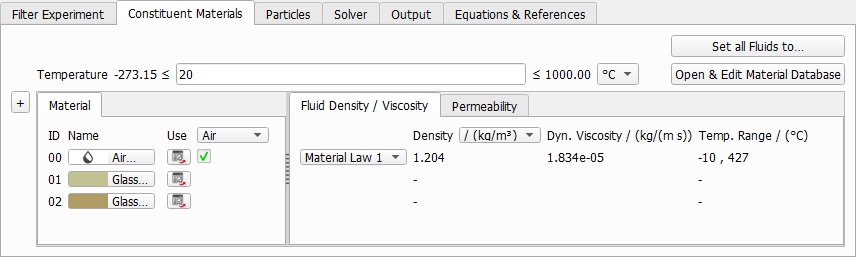
FilterDict uses single-phase flow simulations. It is not possible to run a filtration simulation if two fluids are present in the structure. If multiple fluids are present in the structure, you may click Set all Fluids to …. and select the fluid for the simulation.
The selected fluid is shown under the Material subtab The density and the dynamic viscosity of this fluid is shown under the Fluid Density/Viscosity subtab.
If a fluid from the GeoDict Material Database is used, the values for Density and Dynamic Viscosity are taken from the database and can be dependent on the given Temperature value. If Manual is chosen, these values can be entered manually:

To add materials to the database, use the Open & Edit Material Database button. More information on editing, expanding, and using the GeoDict Material Database is available in the Material Database handbook.
Also, under the Material subtab, the material IDs of the materials in the structure are shown (00, 01, 02, etc.). Choose materials by clicking on the material buttons.
Under the Permeability subtab, enter the permeability of porous materials present in the structure. As long as there are only fluid and solid materials present in the structure, no parameters are needed here:
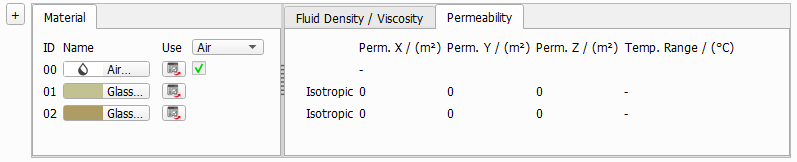
For porous materials, choose if the material is isotropic or anisotropic. In the isotropic case, the permeability is the same in all space directions. In the anisotropic case, enter a different permeability for each space direction.

