Movement
The parameters in the Movement panel define the simulation variables for the particle tracking.
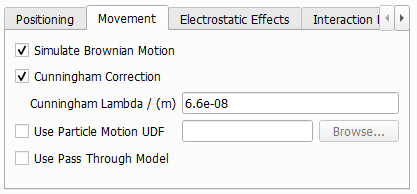
Brownian Motion and Cunningham Correction
Checking Simulate Brownian Motion activates the simulation of random motion in particle movement. If this button is unchecked, the simulation is run with diffusivity .
If Cunningham Correction is checked, equation (244) is used to calculate . Otherwise, is used.
The Cunningham Lambda value is the mean free path used in equation (244) . Make sure, that you use the Cunningham Correction with the default mean free path only in air filtration. Inside of water or oil, the mean free path is much smaller, and there is no need to take the Cunningham Correction into account.
Use Particle Motion UDF
Check Use Particle Motion UDF to replace equations (243) , (244) , (245) and (246) with your own definitions. Refer to the Particle Motion UDF page for details on how to modify and compile user-defined functions.
Use Pass Through Model
If porous materials are present in the current 3D structure, you must check the Use Pass-Through Model box. This option enables particle movement through porous layers and particle deposition in such layers. When this option is switched on, the Pass Through Model column becomes available in the Interaction Model subtab.
