Output
First, select which Output files should be stored. You may select one of the predefined settings Keep all, Keep all except trajectories, Keep none or Individually set
All these files are needed only for visualization of the results. The choices made here do not influence the filter lifetime results contained in the GDR (result) file but may disable some of the visualization options which require to load additional data.
When Keep all is checked, all intermediate files written and read by the flow solver, particle tracker and electrostatic solver are kept. If the filter model is large, and/or the simulation contains many batches, a large amount of potentially unnecessary data is stored in that way.
Check Keep all except trajectories if you want to keep all data files except of the particle trajectories. Trajectory files are needed solely for visualization of the particle movement and may become very large if many particles are tracked.
Check Keep minimum to continue simulation to save only the files need to continue from an interrupted simulation.
Check Keep none if you want to reduce the amount of hard disk space needed as far as possible.
If you select Individually set, you may decide in detail which files to keep for visualization. For each file type, choose between Keep all, Keep last, Keep first, last and every nth, Keep first and last and Keep none.
Decide, for which batch this file type is stored: every batch, only the first and/or last batch, or set an interval such that this file type is stored for every nth batch.
In that case, set the Save interval n:
 .
.To visualize the movement of particles, you need to keep the Trajectories. Be aware, that these files may become very large if many particles are simulated. You can influence the file size and the precision of the stored trajectories (e.g. the number of points on the particle paths saved in the file) by two additional parameters:
- Check Trajectory File Contains All Collision Points to add all points where a particle touches the surface of a solid object to the trajectory file.
- The value entered as Trajectory Precision determines how accurately the trajectories are stored. The given value determines the traveling distance between two points stored in the trajectory file.
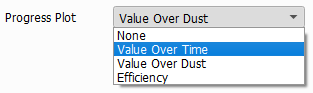
Select which plot is shown during the computation by setting Progress Plot to either None, Value (i.e. pressure drop or flow rate) Over Time, Value (i.e. pressure drop or flow rate) Over Dust or the fractional filter Efficiency achieved over all batches.