Electrostatic Effects
|
Important! This tab is only available if there are no porous materials present in the 3D structure. |

Check Include Electrostatic Effects to simulate electrostatic effects between filter media and particles in the fluid.
Particle Charge
If electrostatic effects are negligible, set Particle Charge to No charges.

Select Proportional to surface area and enter a Surface Charge Density to set the value of in equation (242) to the product of the entered Surface Charge Density and the particle surface area.
Select Individual per particle type to enter an individual particle charge for each particle type or size. In this case in equation (242) is the entered particle charge. Enter the desired values in the Particle Charge [C] column that is automatically added to the table under the Size Distribution subtab.
If Boltzmann Random is chosen, particle charges follow a normal distribution with mean value 0 and standard deviation
where denotes the particle diameter, the dielectric constant, the Boltzmann constant, the temperature and the electron charge.
|
Note! Electrical charges appear only as multiples of the elementary electric charge. Since GeoDict 2025, the Boltzmann Random distribution is therefore discretized into elementary electric charges. For large particles, this approaches a normal distribution of charge values, whereas small particles are mostly uncharged or carry just a single positive or negative charge. |

Material Charge
Select Constant surface charge density and set the Surface Charge Density (C/m²), which corresponds to in equation (248) .

This charge density is applied to all solid material surfaces.
Select Individual per material ID to set different surface charge densities for different material IDs. If selected, an addition column Surface Charge (C/m²) appears on the Interaction Model tab. Enter the surface charge density of each material ID there.
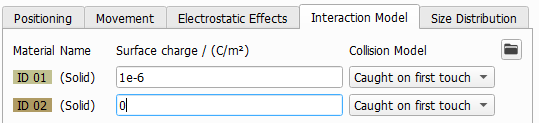
The charges are given ‘per surface area’, therefore it is of special importance how the surface area is taken into account in the simulation. GeoDict uses a voxel grid. When simply applying the surface charge to each voxel surface, the overall charge would be overestimated, because the sum of all voxel surfaces overestimates the true surface area of the material. Therefore, the given surface charge density is corrected by the ratio between the computed surface area of the material (see the Estimate Surface Area command in the MatDict handbook) and the sum of the voxel surfaces.
|
Note! Until GeoDict 2022, particles and filter were assumed to have opposite charges. Entering positive surface charge values for filter and particles lead to the filter attracting the particles. This was unintuitive and did not reflect the correct physics. Therefore, since GeoDict 2023, it is no longer assumed that particles and filter have opposite charges. Entering opposite sign charge values (e.g. 5e-7 C/m² as surface charge and -6e-7 C/m² as material charge) for filter and particles leads to the filter attracting the particles. In this case, the filter efficiency is enhanced. Entering same sign charge values leads to the filter repulsing the particles and a lower filtration efficiency. |
Enable Dielectrophoresis
Dielectrophoresis is a phenomenon in which a force is exerted on a particle when it is subjected to a non-uniform electric field . This force does not require the particle to be charged. All particles exhibit dielectrophoretic activity in the presence of electric fields.
When dielectrophoresis is enabled, the force in equation (242) is computed as
Here, is the relative permittivity of the particles, is the relative permittivity of the fluid, and is the particle radius. denotes the gradient of the electric field and dictates the direction of the dielectric force.
Switch this effect on by marking the check box, and enter the relative permittivity values and in the dialog:
 .
.
Decay of Surface Charge
The initial material charge may decay during the filter lifetime. It is possible to use a simple decay model in GeoDict to model the reduction of the surface charge over time.
You may either select to use a user-defined function for the decay or use a built-in simple decay formula.
The decay of the charge follows the equation
Thus, the initial charge is eventually reduced to
To fit the decay model, select the Minimum Surface Charge Ratio , which should be a number between 0 and 1. Select further, if the Decay Variable is the amount of deposited Dust (in kg/m²) the Time (in s) or the Dust Solid Volume Fraction (in %). The Surface Charge Decay Factor determines how quickly the charge decays.
