Positioning
Particle Initial Position
Particle Start Position
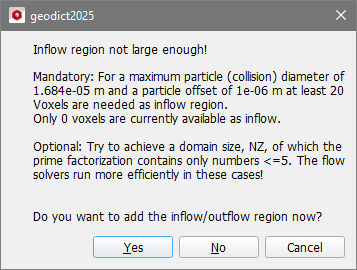
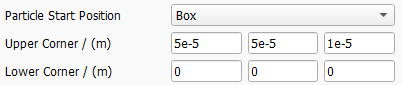
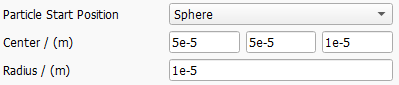
Select one of the following Particle Start Position types. The default start position is the Inflow Plane.
 Inflow Plane

Chosen Material ID
Particle Positioning Weights
Particle start positions are scattered randomly inside the defined Particle Start Position area or volume.
By default, those positions are uniformly distributed. Be aware that a spatially Uniform placement in the inlet will lead to an increased particle concentration in areas with low fluid velocity, e.g. in proximity to a surface or a walls.
If Velocity is selected, the starting probability is based on the local fluid velocity. Selecting this option will lead to a uniform particle concentration in the inflow.
If Distance is selected, the starting probabiliy is based on the distance from the next solid object. This will lead to higher particle numbers in the core flow, while there will be less particles starting next to the surface.
With GivenField, it is possible to load an arbitrary 3D field of scalar values to define the starting probability. For example, it is possible to load the flow field of a previous computation and select the velocity or one of its components.

Random Seed
Particles to be filtered are placed randomly in the area according to the selected Particle Start Position. The parameter Random Seed controls the underlying random number generator. The same random seed produces identical results, whereas results with different random seeds are similar but not identical.
Ghost Particles
FilterDict simulations usually consider only a small cutout of the filter media and typical test dusts contain only a very small number of large particles. Together, this leads to the effect that the arrival of a large particle is not very likely and does not happen in every batch, which makes it impossible to compute a fractional filtration efficiency per batch with statistical relevance.

Ghost Particles can be added to help to increase the statistical reliability of the efficiency results in each batch. They are tracked like ordinary particles and counted as filtered or unfiltered. Afterwards, they disappear, so that they do not clog the filter or influence the results of later time steps (batches) in any other way.
After checking Ghost Particles, choose the Min. Number of Particles per Type and batch.
For example, in the first batch, 300 real particles of 1 µm and 30 real particles of 5 µm are simulated. Enough real particles of size 1 µm are already present, so that when entering 100 as the minimum number of particles per type, 70 ghost particles of size 5 µm are added to the simulation. The fractional filtration efficiency of particles of size 5 µm is then computed using all 100 simulated particles (30 real particles + 70 ghost particles).
Particle Multiplicity
When the Particle Resolution is set to Unresolved in the Constituent Materials tab, the parameter Particle Multiplicity becomes available and a value can be entered in the Max. Number of Trajectories per Type box.

Unresolved particles may be much smaller than the used voxel length and thousands of dust particles are needed to fill a single voxel. Therefore, the number of Particles per Batch (on the Solver tab) may grow very large, leading to increased simulation times. With Particle Multiplicity, the number of particles that are tracked can be restricted.
When, for example, 1,000,000 particles of diameter 0.05 µm are to be simulated in the next batch, and the user checks Particle Multiplicity and sets Max. Number of Trajectories per Type to 10,000, only the movement of 10,000 particles is tracked. However, each of these particles represents 100 particles, and the multiplicity is 100 (100 x 10,000 = 1,000,000). If one of these particles is filtered, the mass and volume fractions of 100 particles are added to the deposited dust.
To make sure that the choice of Particle Multiplicity does not introduce large numerical errors, FilterDict ensures that the particle volume multiplied by its multiplicity is less than 5% of the single voxel volume.
Reflect particles at inflow plane
If diffusion through Brownian motion is simulated, some particles might diffuse against the flow direction, reach the inflow region and exit the domain. Check Reflect particles at inflow plane to avoid the exit of such particles.
Particle Injection
All particles simulated in a time inteval (a batch) move independently from each other. Select, if all particles should start moving at the beginning of the time interval (Batch Start) or if starting times should be distributed uniformly over the batch interval (Continuous).
While Continuous offers a physically correct description of what happens in a real filter experiment, it may make a later visualization of the particle movement almost impossible: In a typical air filter media simulation, a batch interval may last minutes, while particles move with a velocity of several meters per second through a filter material of less than a millimeter thickness, which means that at most observation points in time, no moving particles can be seen. This can be overcome by letting all particles start at Batch Start, or distributed over a short time interval at the beginning of the batch (Batch Continuous).
The selection made here has very little influence of the computed results, because in any case all particles of the same batch do not interact with each other: they cannot collide in flight, and they cannot deposit on top of each other. They can only interact with the particles deposited in previous batches.
Particle End Position
Particles reaching the outflow plane are always considered as unfiltered.
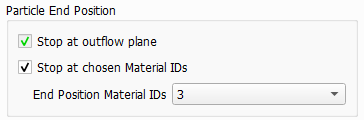
Additionally, and similar to the definition of the particle start position, an additional area can be marked and particles which arrive in those area will also stop moving and are counted as unfiltered.
