Constituent Materials
On the top of this tab, select if the Particle Resolution is Resolved or Unresolved.

Choose Resolved if all particles are larger than the current voxel length, and Unresolved if some particles are smaller than the current voxel length. For further explanation, see Resolved and Unresolved Simulations.
Define Temperature and Fluid Density/Viscosity as described for the Constituent Materials tab of the Filter Efficiency command.
Permeability
If no porous materials are present in the current 3D structure, no parameters have to be set on this tab. For all porous materials, the flow permeability must be set here. It can either be Isotropic or Anisotropic, in which case the permeabilities in the three space directions X,Y,Z can be entered.
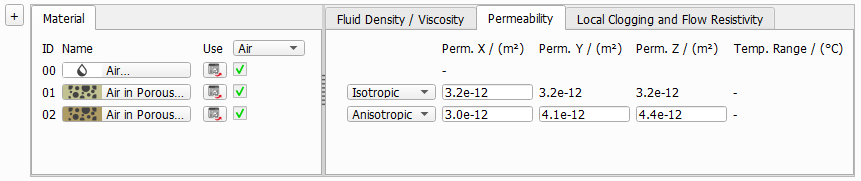
If porous materials are present in the current 3D structure, the Use Pass-Through Model check box on the Particles Movement tab must be switched on, too. This option enables particle movement through porous layers and particle deposition in such layers.
Local Clogging and Flow Resistivity
If the unresolved particle model is chosen, the Local Clogging and Flow Resistivity tab becomes additionally available.
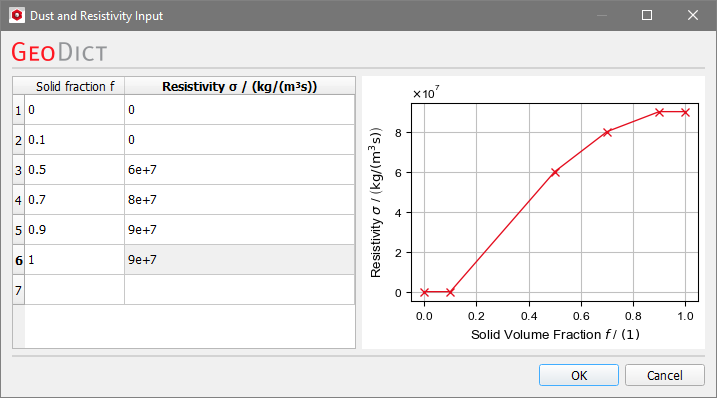
Unresolved particles will create porous voxels when deposited into the 3D structure. In those voxels, flow is still possible, but experiences an increased flow resistivity. In the Local Clogging and Flow Resistivity tab, the relation between the dust volume fraction inside of a voxel and the flow resistivity must be defined. This tab is only available for unresolved simulations, because in the Resolved case all voxels are treated as either empty or solid.
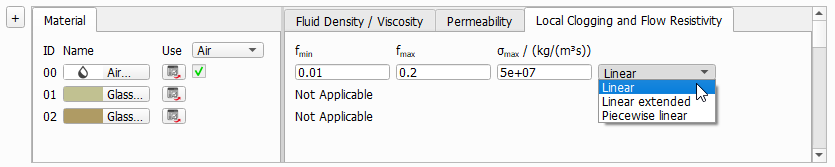
The flow resistivity depends on the values for , and , which must be defined for every material of the structure which can be filled by dust particles during the simulation, i.e. inside of the fluid (where the filter cake will form) and in all porous layers.
|
Note! It is necessary to set these parameters for the fluid material, although this might be unintuitive at first glance. Be aware that the parameters set for the fluid material describe the behavior of the filter cake because the filter cake consists of partially dust-filled voxels of the fluid domain. |

|
Note! It is not possible to use different fluids in a structure, but it is possible to use different material IDs with the same fluid. This option is useful, when the filter cake should have different properties depending on its location in the structure. |
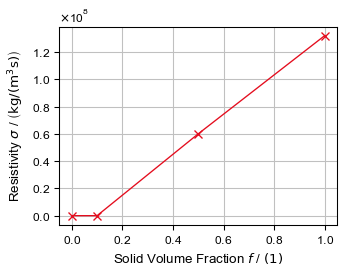
Three different models are available to define the function : Linear, Linear extended and Piecewise linear.
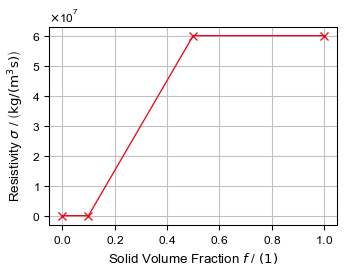

 Linear Extended