Create Training Data
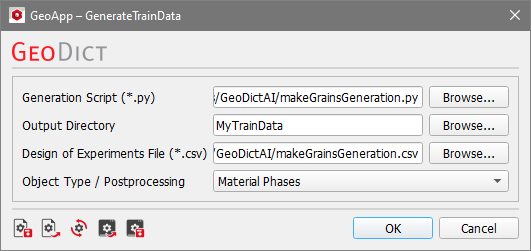
For identifying individual fibers or distinguishing different material phases a generation script can be created as shown here. After designing the experiment the training data can be created. For this, in the GeoDict-AI section select Create Training Data from the pull-down menu. The Generate Train Data Parameters dialog opens when clicking the Options’ Edit… button in the GeoDict-AI section.
If all parameters are set as desired, click OK to close the dialog and in the GeoDict-AI section click Run.
The results are explained here.
 Generation Script
For Generation Script, browse to the *.py file containing the information to generate the training data. How to create this GeoPy file is explained here. Use the same file as for the corresponding Design of Experiments.
|
Output Directory
For the Output Directory, browse to an empty folder to store the resulting training data or create a new folder. The folder must be empty, because it is used to train the neural network.
|
Design of Experiment File
Browse for the created Design of Experiments File (*.csv) to set up the experiment parameter ranges and number of training and test structures. This file is found in the result folder of the Design of Experiments run.
|
Object Type / Postprocessing
Two different Object Types can be selected to define the Postprocessing.
Select Material Phases, if material phases should be distinguished, e.g. grains and binder or circular fibers and trilobal fibers. For this, the Generation Script must produce the files input.gdt and output.gdt as described here.
Choose Fibers (centerlines), if the individual fibers should be identified. With this option, Create Training Data will perform a postprocessing, identifying the fiber’s centerlines and producing the files input.gdt and output.gdt, automatically.

|
Know how! It is important to note that GeoDict enables to identify individual grains as well. For this purpose, use the GrainFind module, where grains are identified using the watershed algorithm.
|
|
Default Example
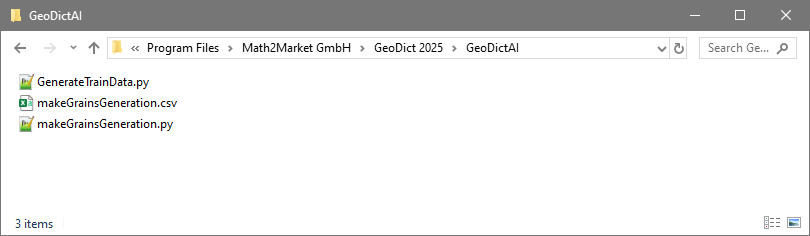
By default, for Generation Script and Design of Experiments File, two example files are loaded. Find the files makeGrainsForTraining.py and makeGrainsForTraning.csv files in the GeoDict installation folder. Browse for the GeoDict installation folder and find the files inside the GeoDictAI folder.
The generation script example generates a grain structure with overlap, adds binder and saves input.gdt and output.gdt. Open makeGrainsForTraining.py in a text editor to examine the structure of the example Generation Script.
The training settings, as the variable values and number of training structures are controlled by the makeGrainsForTraining.csv file. It can be opened in Excel or another text editor.
|