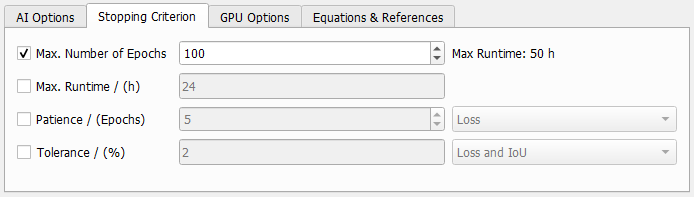
Stopping Criterion
Define the stopping criteria. If more than one criterion is selected, the training is stopped as soon one of them is reached.
 Max. Number of Epochs
The max Number of Epochs determines how many passes over the data (epochs) are made during training. The default of 100 takes some time except for the tiniest data sets. In most cases, smaller values can be used, but as long as the needed number of epochs for the current training is not known, run the training with 100 epochs and observe, when the training converges. Then, the training can be stopped manually. Another possibility in this case is to use the stopping criteria Patience or Tolerance.
If an Epoch Time is entered under the AI Options tab, the Max. Runtime of the training can be estimated and is shown on the right. If additionally the stopping criterion Max. Runtime is selected below, the value on the right of the number of epochs is the minimum of the given maximum runtime and the value given by the number of epochs and the epoch time.
|
Max. Runtime / (h)
Specify a maximum runtime in hours for the training.
|
Patience / (Epochs)
The training is stopped if the chosen criterion did not change for the entered number of epochs. Choose Loss, Intersection over Union (IoU) or both from the pull-down menu. The loss is the validation loss shown in the progress dialog and IoU is the mean IoU. If both are selected, the criterion must be matched by both parameters.
|
Tolerance / (%)
The training stops, after the entered tolerance for the chosen criterion is reached. The selectable criteria are Loss and Intersection over Union (IoU) and the combination of both. The loss is the validation loss shown in the progress dialog and IoU is the mean IoU. If both are selected, the criterion must be matched by both parameters.
The tolerance considers the relative change from the last to the current epoch. The tolerance has to be lower than the entered value for two epochs in a row to stop the training.
|