Run Training
After setting the parameters click OK to close the dialog.
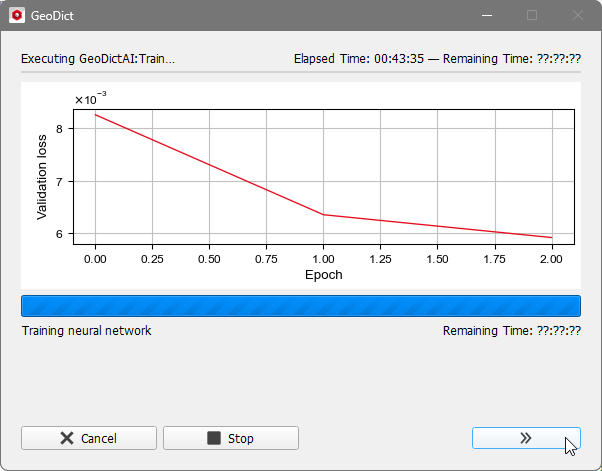
After clicking Run observe the training in the progress dialog and for more details open the GeoDict Console by clicking on the double arrow in the bottom right of the dialog.
For each epoch the number of windows used for training and validation is given in the first two lines.
Afterwards find the IoUs for each class.
The epoch number, epoch duration, loss and mean IoU are found in the fourth line.
 Epoch
Epoch
An epoch is a single pass over all the data. After each epoch, the current values for the neural network performance, i.e. the IoU, training loss and validation loss, are shown in the console and a .gnn file is written to the result folder for every step. Also, observe the duration time of one epoch. If one epoch only needs a few seconds, the downsampling factor should be increased.
|
Training Loss and Validation Loss
To consider the convergence during training, observe Training Loss and Validation Loss in the GeoDict Console. These correspond to the two subsets of the data defined by the Train / Test Split Factor set up in the Train Neural Network Options dialog. In neural network training the term “Loss” defines the current error of the neural network. The Training Loss is computed during each epoch while training on the training subset of data. The Validation Loss is computed while applying the current network of the epoch on the validation subset of data.
In the progress plot on the left of the progress dialog, the convergence behavior is visualized for the Validation Loss.
Ideally, both loss values converge towards zero, meaning zero error. In the following the three different scenarios that can occur in training are discussed:
- Both losses do not go down/stagnate: Either the network does not have enough context in a window, and the Window Size must be increased, or the nature of the problem is too complex for the network and the Depth or the Number of Features in First Layer must be increased.
- Training loss goes down, validation loss does not: This is usually a sign of overfitting, e.g., the network "memorizes" the training data and does not generalize to the test data. The solution is usually to feed in more data, e.g., by generating more training structures or training images.
- Both losses go down and converge towards zero: The training converges and thus, the network works well on the training data and generalizes to the test data.
As the scale of the figures vary with the parameters in structure generation, it is currently not possible to specify a “good” numerical value for the loss. Consider the shape of the convergence for the current application and remember the values for similar trainings in the future to estimate the training performance. As described in the categorization above, the Validation Loss is the more important number to consider primarily.
|
IoU
The IoU (Intersection over Union) is a common tool to measure the current performance of the neural network in each epoch. IoU considers the ground truth and the predicted data. The ground truth is the data taken from the output.gdt files, while the predicted data means the input data labeled by the current network. The score then is the ratio of the intersection and the union of the two. This can also be described with the confusion matrix.
A IoU score of 1 would be a perfect fit, meaning that all voxels were labeled correctly leading to FN = FP = 0. Thus, a value near 1 already indicates a very good model.
Similar to the Validation Loss, the IoU is measured on the test subset of the training data defined by the Train/Test Split Factor. But while the validation loss considers the confidence of the neural network, the IoU only considers the result (target material or not). Thus, the IoU is a more comparable measurement tool.
The IoU is computed separately for each material class to identify. They are shown in the third line of each epoch, followed by their mean value. Observe the mean value to learn about the overall training performance and the separate IoUs to find out if one material class is more difficult to identify as the others.

|
Know how! The IoU only makes sense for classification tasks as identifying materials or individual fibers or segmenting grayscale images. For enhancing grayscale images, always consider the validation loss.
|
|
Cancel or Stop Training
The training is run until the Maximal Number of Epochs is reached or the training is stopped manually. It is recommended to click Stop rather than Cancel, as far as Stop still produces a result file and keeps all results already generated and saved in the result folder. Contrary, Cancel deletes the complete result folder. It can be necessary to stop the training manually, if for example a too large number of epochs was selected, and the training already converges long before the number is reached.
|