Results
The training produces a GeoDict result file (*.gdr) and a folder with the same name. Both are saved in the chosen project folder (File → Choose Project Folder... in the menu bar).
 Result Folder
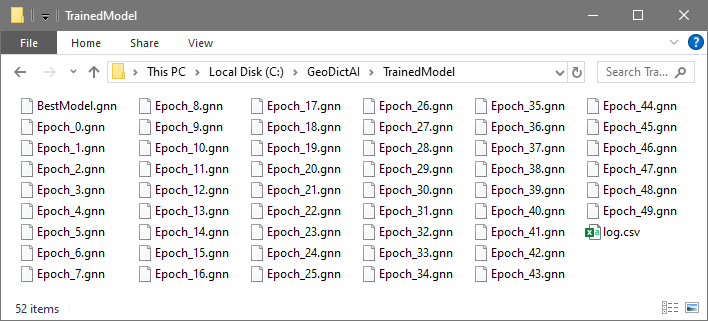
Often the latest neural network performs best, but if the training convergence is not monotonous, this can be different. Thus, the result folder contains a GeoDict Neural Network (*.gnn) for each epoch and the neural network with the minimal validation loss, which is called the BestModel.gnn. Find the corresponding epoch in the Result Viewer as shown below. During the training in every epoch, when a new minimal loss is found, the corresponding *.gnn file is copied and renamed to BestModel.gnn.
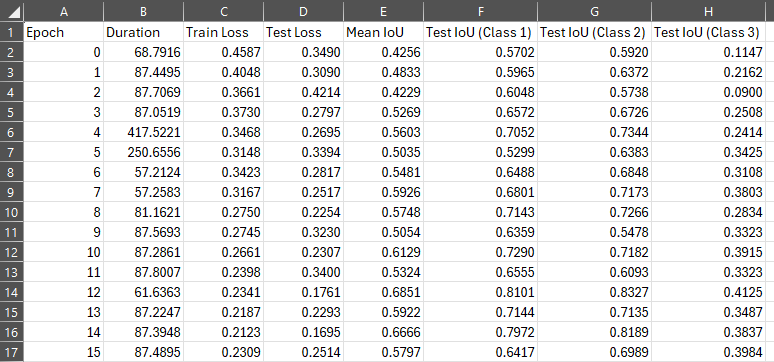
The file log.csv documents the duration, loss, and the different IoU for each epoch. These values are also shown in the progress dialog as explained here. Inspect the file with a text editor. Here, it was opened with Excel.
|
Report
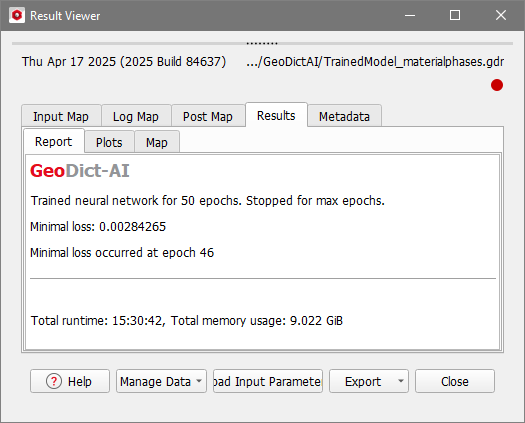
The GeoDict Result Viewer opens for the result file and statistical properties of the training are shown in the Results – Report subtab.
The first line shows after how many epochs the training was stopped and which criterion led to the stop.
The Minimal Loss is the smallest Validation Loss, that occurred during the training. The epoch corresponding to this loss value is given in the last line of the report. While the training in the example was done for 50 epochs (epoch 0-49), the minimal loss (0.0028) occurred already at epoch 46. Thus, in this example the BestModel.gnn is not the last model Epoch_49.gnn, but Epoch_46.gnn.
|
Plots
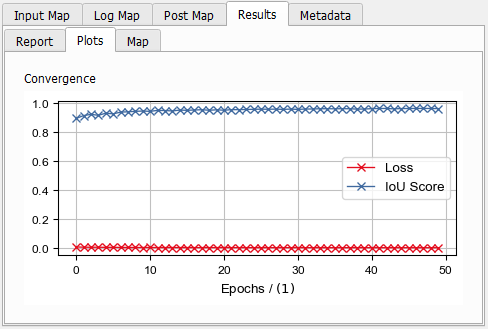
In the Result Viewer, under the Results - Plots subtab, find the Convergence plot showing the Validation Loss and the mean IoU Score for each Epoch.
Right-clicking in the plot gives access to many post-processing options regarding the plot. In detail they are described in the Result Viewer topic. For example, select which plots should be shown.
|
Use neural network
As soon the training is finished, the resulting network BestModel.gnn (or any other network *.gnn) can be validated with Validate Performance. If the network is trained to distinguish between material phases, it can be applied with the Apply Neural Network option.
If networks are trained to enhance 3D-scans, they can be applied with Enhance Grayscale Image.
Networks trained to segment grayscale images can be used with Segment Grayscale Image.
Otherwise, if networks are trained to identify individual fibers, use FiberFind Identify Fibers (AI) as described in the FiberFind handbook.
|