Domain
The Domain panel contains the parameters defining the structure size (NX, NY, and NZ) in combination with the resolution (Voxel Length), as well as the Origin parameters, the Periodicity checkboxes, the Center Domain button, and the Pore/ Matrix Material pull-down menu. The periodicity boxes are always checked for Pile, because the objects are always piled periodically
 NX, NY, NZ, and Voxel Length
The internal representation of a structure in GeoDict consists of rectangular 3D arrays of equally sized boxes, hereafter called volume elements or voxels. NX, NY, and NZ are the number (N) of voxels in X, Y and Z directions.
The Voxel Length is the size of one voxel in the chosen units. Varying the values for NX, NY, and NZ has the effect of changing the size of the piled structure in the given direction. Low values for voxel length in combination with high values for NX, NY and NZ result in a higher resolution, but also in a higher computational time. After setting the values of NX, NY, and NZ, and Voxel Length, the physical structure size is automatically displayed in the chosen units.
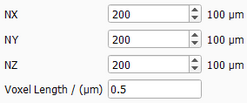
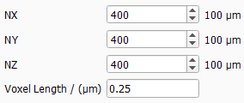
Observe how keeping the structure size a constant 100 x 100 x 100 µm3 while decreasing the Voxel Length from 0.5 µm to 0.25 µm has the effect of refining the spheres in the pile by increasing the resolution. Since the voxel length has decreased to half, the size of the structure is kept by doubling the NX, NY, and NZ values from 200 to 400.
|
Origin X, Origin Y, Origin Z, and Center Domain
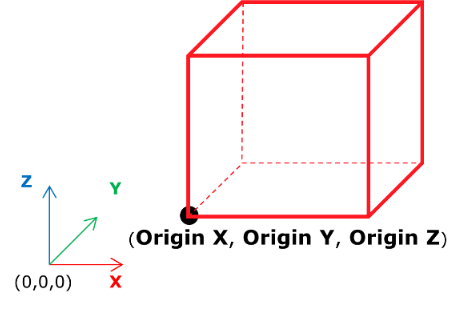
The Origin X, Origin Y, and Origin Z parameters, together with the Center Domain button, determine the placement of the structure in the physical space. Zero values for Origin X, Origin Y, and Origin Z mean that the point with (0, 0, 0) coordinates is located at the lower left corner of the structure.
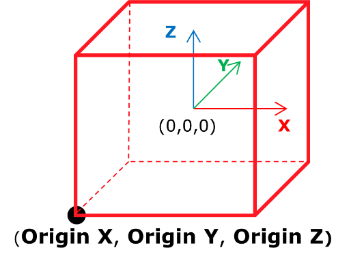
When clicking the Center Domain button, the (0, 0, 0)-point is set to the center of the structure as shown below.
|
Periodic X, Periodic Y and Periodic Z
For GrainGeo Pile periodicity is always applied in all three directions. To learn more about periodicity refer to the Domain chapter of the Create parameters
|
Pore / Matrix Material
Choose the material of the pore space or the matrix around the objects from the pull-down menu.
When the material is chosen to be Pore, the objects are embedded in empty pore space. Otherwise, the material filling the matrix can be chosen to be a Solid, Porous medium, or Fluid in which the objects are embedded.
|