Results
Click OK to input the entered parameters and then click Run in the AcoustoDict section to start the command.
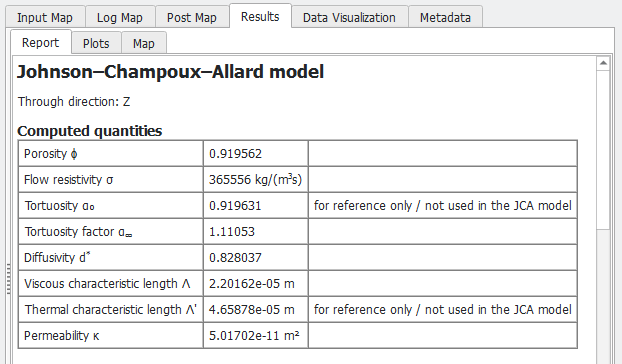
The results are immediately shown in the opening Result Viewer after the process is finished, the screenshot below shows the calculated acoustic parameter values for the Johnson–Champoux–Allard model. The Results→Report subtab shows porosity, flow resistivity, tortuosity, tortuosity factor, diffusivity, viscous characteristic length, thermal characteristic length, and permeability in the direction of interest.
Absorption curve
The frequency–absorption curve is computed for a stack of materials in Kundt tube setup, consisting of a layer of (homogenized) solid material described by the computed flow resistivity and porosity and a layer of air located between the solid material and a wall.
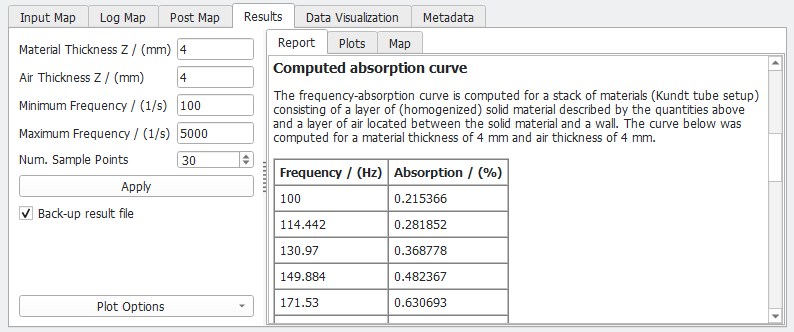
The thickness of the material and the air layer can be set in the panel on the left, as Material Thickness Z and Air Thickness Z. By default, 4 mm are used for both values.
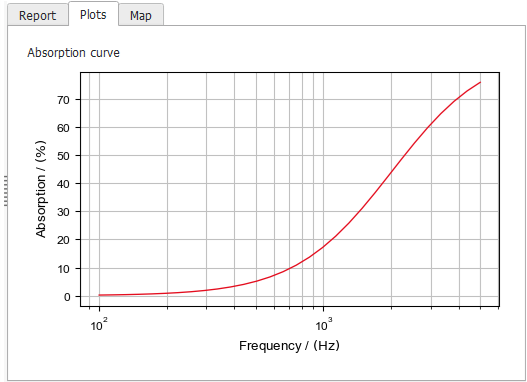
The absorption is computed in a range given by the Minimum Frequency and Maximum Frequency values, using the given number of Sample Points. The curve is shown in the Results→Plots subtab.
The Results→Map subtab gives access to the media-dependent acoustic parameters values computed for the selected acoustic model.
