Identify Fractures
The Identify Fractures GeoApp analyzes the pore morphology and segments the selected material ID into fractures, small, and large pores. The GeoApp applies multiple runs of Identify Pores and its corresponding post-processing to distinguish between pores and fractures.
|
Modules needed to run this GeoApp: PoroDict |

Click Edit to open the Identify Fractures Parameters dialog.
The Identify Fractures GeoApp has two main features. The first feature, Separate fractures from pores by the following features, segments the selected Pore/Fracture Material ID into fracture and pore phases. The second feature, Segment pore sizes, allows differentiation between small and large pores. When both features are activated, differentiation of pore sizes is performed only on the pore phase, not the fracture phase.
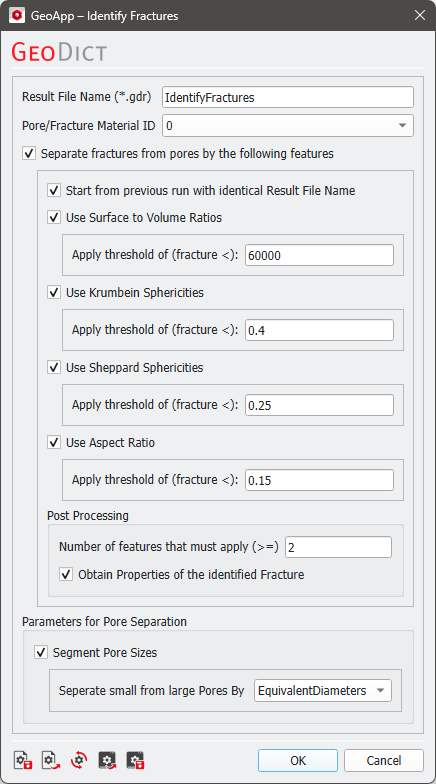
For fracture identification, void spaces in a structure are considered fractures if the values are below the chosen Threshold for each parameter. These parameters can be modified if necessary. The default threshold values may already correctly segment fractures. To improve the results, adjust the threshold values according to the current structure. In the Post Processing section, choose the Number of features required to identify a fracture phase. This number must always be smaller than or equal to the number of activated features. When Obtain properties of the identified fracture is activated, an additional instance of Identify Pores is executed on the previously identified fractures.
If the Identify Fractures GeoApp is executed on a structure but the segmentation needs improvement, it should be re-executed iteratively to obtain the best result. This can be done by re-running the app with different values until a sufficient result is achieved. To save time, activate Start from previous run with identical Result File Name. This skips the first Identify Pores instance and uses the previously created *.gdr file to execute post-processing.
Click OK to close the dialog, go back to the GeoApp section, and click Run.
Results
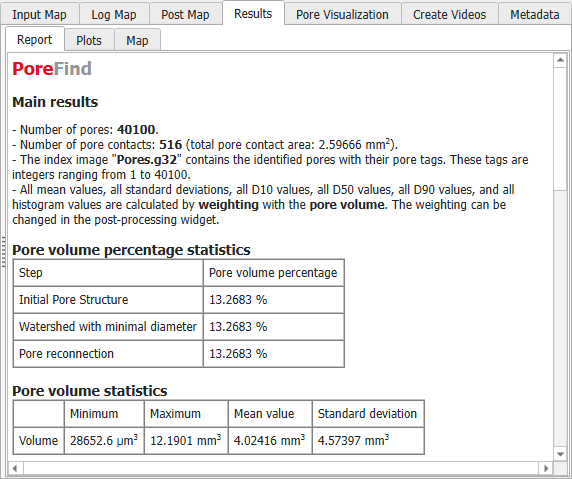
When the computation is finished, and the checkbox of Obtain properties of the identified fracture is checked, the Result Viewer of the result file (*.gdr) opens automatically. Find the results in the Results - Report, Results - Plots, and Pore Visualization tabs. The result file is created using PoroDict - Identify Pores.
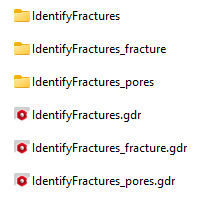
Three result files and result folders are generated and can be found in the main result folder.
The prefix is based on the chosen Result File Name (default is IdentifyFractures). The IdentifyFractures folder contains the results of the Identify Pores instance which was executed on the structure. The thresholding of the fractures by features, is executed on the contained IdentifyFractures.gdr.
When Obtain properties of the identified fracture is activated, the IdentifyFractures_fracture folder contains results of the respective Identify Pores run.
When Segment pore sizes is activated, the pores in the structure are segmented by their Volume or Equivalent diameters (IdentifyFractures_pores). In this case, the folder IdentifyFractures_pores is created which contains the Identify Pores run performed on the pores.
The following example shows how fractures and pores can be separated. The pore space belonging to an identified fracture is assigned to the corresponding material phase. The remaining pore space, which does not belong to a fracture, is divided into large and small pores based on their Volume or Equivalent diameters.
