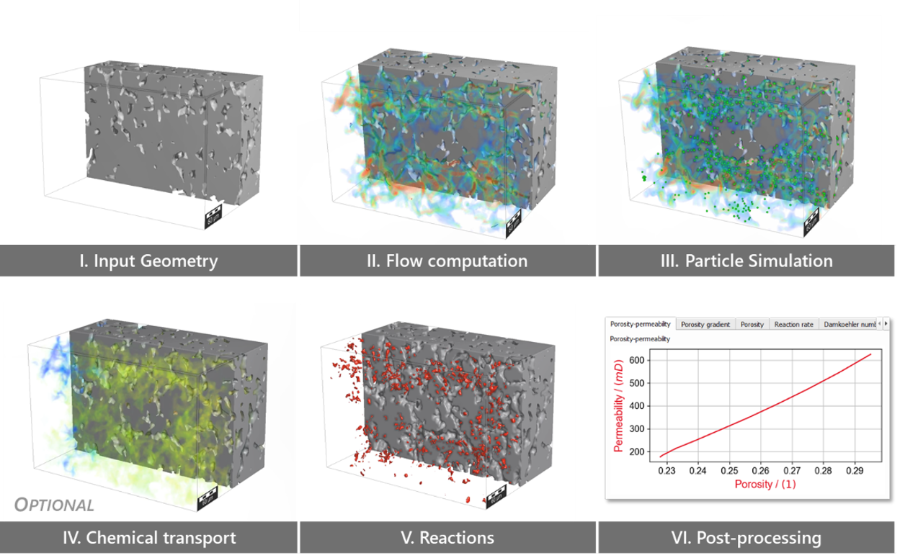
The Reactive Flow – iPhreeqC model GeoApp computes dissolution and precipitation of mineral phases during continuous inflow of reactants (e.g., acid) and predicts:
4D rock alteration: automated generation of animations that enable visual determination of the precipitation and dissolution patterns in addition to the analysis via various plots that are generated automatically
Chemical transport in the geometry, determined on the voxel scale
For solving Reactive Flow for the various application areas, the geochemical calculator PhreeqC (USGS) is coupled to GeoDict to compute geochemical transport and mineral dissolution / precipitation based on the Lagrangian Transport method.
Modules needed to run this GeoApp:
AddiDict
Optional: FlowDict, PoroDict
Click Edit to open the Reactive Flow – iPhreeqC model parameters dialog.
Choose a Result File Name for the resulting GeoDict result file (*.gdr) and the corresponding result folder.
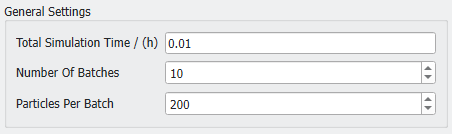
Under the General Settings define the Total Simulation Time, the Number Of Batches and the Particles Per Batch for the reaction rate simulation. During each batch first the flow is computed if the current and relative porosity change is larger than 1%. Then, the transport is computed and finally the reactions at water-rock interfaces are computed. Fewer particles decrease the accuracy of the simulation. Using more particles increases the accuracy while leading to longer runtimes. As a rule of thumb, it is sufficient to use the number of pore voxels at the inflow boundary (approx. nx*ny*porosity). Feel free to decrease that number for ~linearly improved performance at a relatively lower cost of accuracy.
The Reactive transport experiment is based on advection-diffusion-reaction or diffusion-reaction. In both cases the transport is computed along the Z-axis.
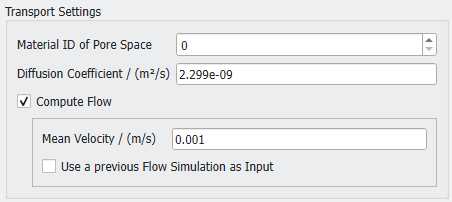
Select the Material ID of Pore Space and set the Diffusion Coefficient. This coefficient affects the inflow fluid transport paths according to the Brownian motion. The default value is the self-diffusion coefficient of pure water at 25°C.
Select Compute Flow if a reactive flow experiment should be performed by computing the flow field regularly. This requires a FlowDict license. For this, define the Mean Velocity. Alternatively, a previous Flow Simulation can be used as input, which is especially beneficial in case of restarting simulations in large geometries.
Two Geochemical Models can be selected for the simulation.
You do not need a separate PhreeqC installation to run this reactive flow model. But, we recommend to install PhreeqC, get used to the software and set up your geochemistry therein in advance. Please make sure to check your setup for reactive mineral phases and to balance the electrical charge.
PhreeqC Geochemical Equilibrium Thermodynamics (PGET) calculates reactions based on the input of aqueous fluids by employing the geochemical calculator PhreeqC.
PhreeqC Calcite Reaction Kinetics (PCRK) calculates kinetic reactions with calcite as the reactive mineral phase and is based on the input of aqueous fluids by employing the geochemical calculator PhreeqC. The database (phreeqc.dat) for calcite kinetics is however limited to ambient conditions.
For PGET select a PhreeqC Database. The databases are located in the app folder within the GeoDict installation folder and can be adjusted or replaced. This may require administrator rights. For reservoir conditions with high pressure, temperature, and salinity the pitzer database is recommended. For most other setups the phreeqc database should work well. Additionally, the llnl (Lawrence Livermore National Laboratory) database is available, which contains the highest number of mineral phases. Note that we have not included all of the approx. 2000 mineral phases considered by the llnl database. Feel free to contact us if you are missing a specific mineral phase.
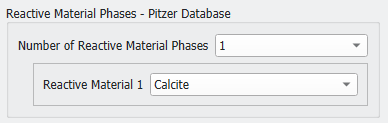
Define the Number of Reactive Material Phases and select each Reactive Material from the pull-down menu. The chosen mineral phases will be dissolved and / or precipitated based on the PhreeqC calculations. The available materials depend on the selected database.
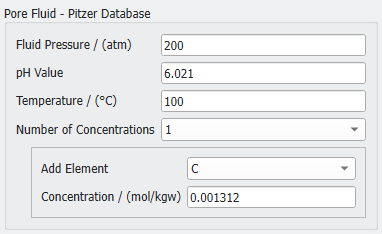
Set the Fluid Pressure, pH Value, and Temperature. For pressure and temperature, values are limited to the ranges specified for the corresponding database. Subsequently, set the Number of Concentrations for both the pore fluid (formation fluid) and the inflow fluid (injected fluid). For each concentration, select the Add Element and enter a Concentration value in mol per kg water (mol/kgw), which is the default PhreeqC unit.
PhreeqC calculates using element concentrations and converts them into the respective molecules for further geochemical calculations. This requirement is well in line with hydrogeochemical fluid analysis, so the user interface is designed towards these factors.
Important! Please make sure to equilibrate your fluids in advance (e.g., via PhreeqC). This includes an electric charge balance for both fluids and an equilibrium of the pore fluid with respect to the reactive materials (mineral phases) selected above. Note that future GeoDict developments will aim at a simplified user experience in this context.
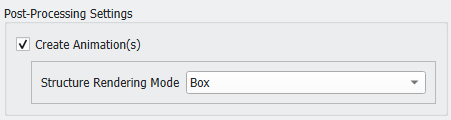
Decide if the structure changes during the reactive flow simulation should be animated in a video by selecting or deselecting Create Animation(s). In case of a geochemical model including PhreeqC calculations pore fluid animations are created as well. Animations have a default length of 10 s each. They are especially smooth in case of a large number of batches.
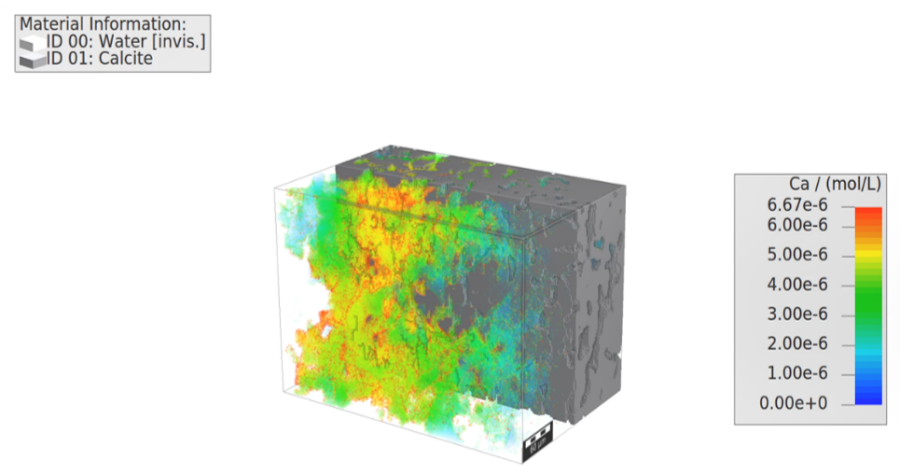
Note that for an improved visibility of geochemical transport with respect to the inflow fluid a transparency is introduced for the initial pore fluid concentration.
For the animation select if the structure should be rendered with Box, Smooth, or GPU renderer.
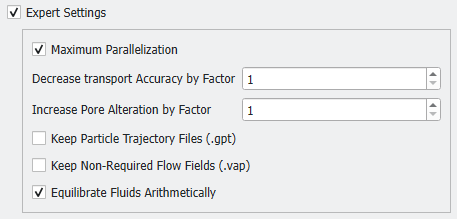
The available Expert Settings include Parallelization, defining the factor for Decreased Transport Accuracy and Increased Pore Alteration, selecting to Keep Particle Trajectory Files and Non-Required Flow Fields, and deciding to Equilibrate Fluids Arithmetically or not.
A decreased transport accuracy improves the geochemical performance at the cost of transport accuracy. The value shouldn’t be increased above 1 unless there is no other option left.
Note!Increase Pore Alteration increases the reaction time beyond the transport time. This option allows you to compute reactions at time scales beyond s / min / h. Technically, the computed volume of dissolved / precipitated mineral phase is scaled by the given factor. It is thus recommended to first calculate a reasonable value. This could be exercised via PhreeqC. As an alternative, you could run test simulations in small structures and investigate the fraction of minerals altered at voxel surfaces as stored in the corresponding volume file (e.g., SolidFractions01.gvf) in your result folder.
By default, some non-required files are deleted from your result folder during the reactive flow simulation to save disk space. You may deactivate this behavior by checking the Keep options.
Finally, Equilibrate Fluids Arithmetically significantly improves the performance by reducing the overall amount of PhreeqC calculations for the geochemical transport.
After completing your individual setup, click OK to close the dialog. Go back to the GeoApp section and click Run.
Once the simulation finishes, the Result Viewer of the result file (*.gdr) opens automatically. The results show the Number of Batches, Total Simulation Time, Total Reaction Time, and Delta Porosity in the Results → Report tab.
Multiple result plots are found under the Results → Plots tab, depending on your setup: Porosity-permeability, Porosity, Porosity gradient (in flow direction), Reaction rate, Damkoehler number (Da), Péclet number (Pe), and PeDa number (product of Pe and Da).
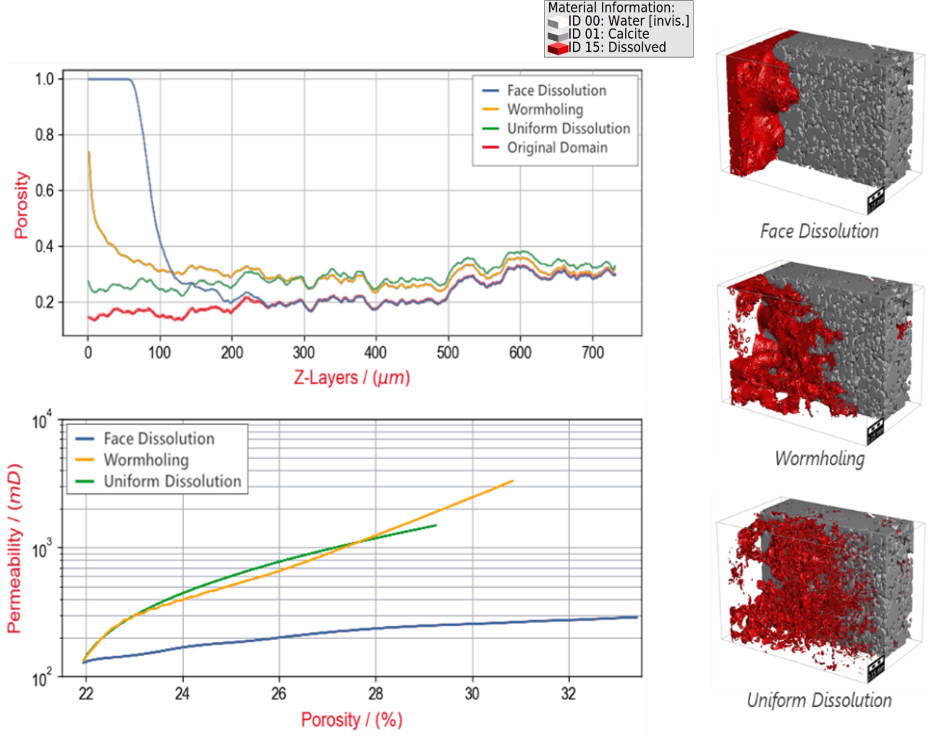
In the following, see some sample visualizations of the computation on a Grosmont carbonate rock (Andrä et. al, 2013) that are generated automatically depending on your post-processing settings and stored in your result folder as images and (*.mp4) animation:
Digital Reactive Flow Experiment considering the entire aqueous geochemistry here showing an intermediate result of a digital kinetically-controlled acidizing treatment of a Grosmont carbonate rock upon inflow of a hydrochloric acid at pH 5.5
Simulation of acidizing treatment in the digital Grosmont carbonate rock using different injection velocities and the same geochemical setup, which results in three main different Dissolution regimes upon usage of the reaction-rate model or pH-based model to dissolve the calcite at computed particle-rock collisions.
The general workflow for Reactive Flow modeling in GeoDict.
Step IV is only considered upon usage of the PhreeqC models.