Reactive Flow - Reaction Rate Model
The Reactive Flow – reaction rate model GeoApp computes dissolution and precipitation of mineral phases during continuous inflow of reactants (e.g., acid) and predicts:
- Permeability reduction & enhancement (porosity-permeability relationship)
- 4D rock alteration: automated generation of animations that enable visual determination of the precipitation and dissolution patterns in addition to the analysis via various plots that are generated automatically
- Chemical transport in the geometry, determined on the voxel scale

|
Modules needed to run this GeoApp:
AddiDict
Optional: FlowDict, PoroDict
|
Click Edit to open the Reactive Flow - reaction rate model parameters dialog.
The parameters are organized into five groups:
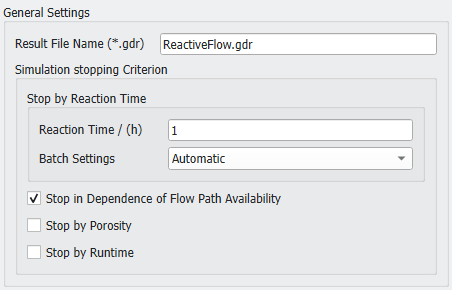
 General Settings
Choose a Result File Name for the GeoDict result file (*.gdr) and the corresponding result folder.
Enter the Reaction Time after which the simulation stops and choose the desired Batch Settings from the pull-down menu. Automatic is based on reaction time and geometry. If selected, the number of times steps (batches) and particles are chosen dynamically. For Manual batch settings the number of Particles per Batch and the Number of Batches from which the time per batch is calculated must be defined manually.
Additional stopping criteria are Stop in Dependance of Flow Path Availability, after reaching a given Porosity, and/or reaching a given Runtime.
|
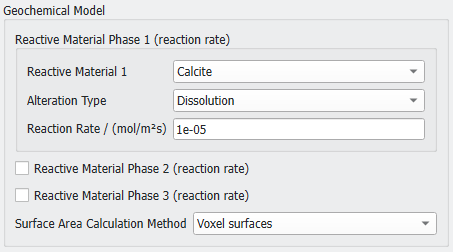
Geochemical Model
Select a Reactive Material from the pull-down menu and set the Alteration Type to Dissolution or Precipitation.
Define the global Reaction Rate of the reactive material phase. This reaction rate is a prerequisite for each batch.
Up to three material phases can be defined here. For materials 2 and 3 the alteration type is always Dissolution.
|
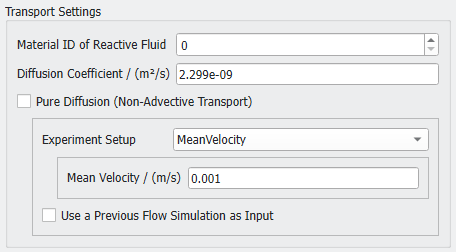
Transport Settings
Select the Material ID of Reactive Fluid and enter a Diffusion Coefficient as described for the iPhreeqC Model GeoApp.
If the transport should be computed from Pure Diffusion, select the corresponding checkbox. Otherwise, depending on the Experiment Setup or reservoir system select Mean Velocity, Pressure Drop, or Flow Rate as input parameter. Enter the according value below. Alternatively, a Previous Flow Simulation can be used as input, which is especially beneficial in case of restarting simulations in large geometries.
|
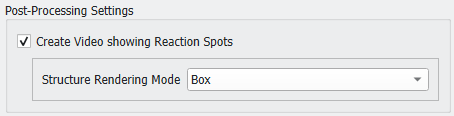
Post-Processing Settings
If Create video showing Reaction Spots is selected, the structure changes are animated with dissolution and precipitation locations highlighted in red, while the solid matrix is made invisible in the front half.
For the animation select if the structure should be rendered with the Box or Smooth renderer.
|
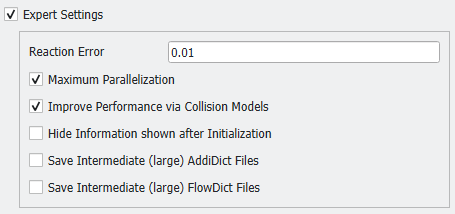
Expert Settings
The Expert settings include Reaction Error, Parallelization, Improve Performance via Collision Models, Hide Information shown after Initialization, and Save Intermediate AddiDict and FlowDict Files.
|
You can find more details on the setup of a Reactive Flow - Reaction Rate Model simulation in our tutorial Reactive flow GeoApp for CO2 sequestration.