GAD Class
The classes for the different GeoDict file formats are named like the file ending for the file type, but with capital first letter. The class for working with *.gad files (GeoDict Analytic Data) is named Gad class. The same holds for the other GeoDict input and output formats.
Creating an object of a class by loading an already existing file is done by typing

Like this, an object of the Gad class is created in MATLAB with the name gad. The object name can be chosen arbitrarily.
To access any function available for the class, call the function on the existing MATLAB object. For example, for accessing the first analytic object of the .gad file (a sphere in the example), call
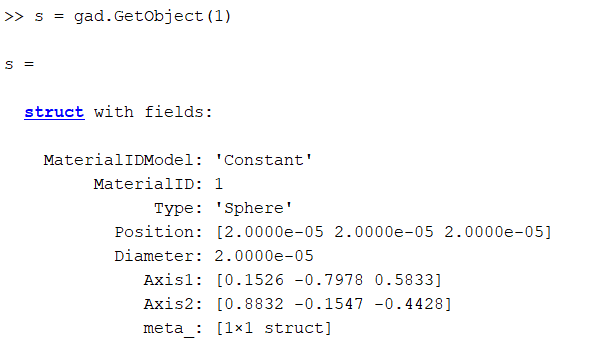
Note, that the name of the created object (gad) is used here, in contrast to the creation of the object above where the class name (Gad) is used.
Note also, that the word object has two different meanings in the example shown above.:
- gad is an object of the Gad class, with all information of the file ExampleGADFile.gad.
- The variable s contains the parameters of the sphere, an analytic geometric object, created in GeoDict, that is contained in the file ExampleGADFile.gad.
For further information about classes and object-oriented programming, see object oriented programming in MATLAB.
To display a list of all available functions for objects of a class, type, e.g.,

in MATLAB, this function is available for all GeoLab classes.
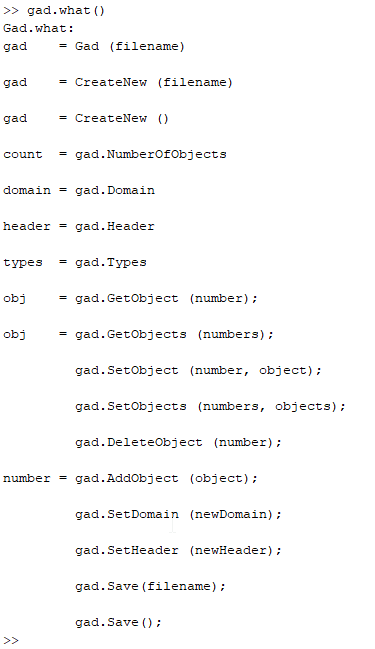
A detailed description of the functionalities available can be accessed in the Lib section of the MATLAB GeoLab documentation.
GAD files are text files which contain structure information in the form of analytic object data. GAD files can be modified with GeoLab.
The analytic objects can be edited, and new objects can be added to the structure. Various applications are possible. For example, it is possible to bend fibers between simulation steps or simulate crystal growth by adding objects. The generation of new GAD files in GeoLab is also possible, so even the programming of your own structure generators in MATLAB is possible.
For further information about the GAD format, see the GadGeo chapter.
GeoLab’s GAD class allows to load and edit GAD files. Objects of the structure can be edited, added or deleted with the functionality of the GAD class. The domain itself can be edited, like changing the number of voxels in X, Y and Z direction or changing the voxel length. Other properties of GAD files, like the constituent materials, can be accessed and modified as well.
For detailed information about working with objects of the GAD class in GeoLab, see the GeoLab documentation in MATLAB.
