Material and Preview
Determine the material and observe a preview visualizing the current settings entered in the Create Options and Custom Generation Options tabs.
Material
The generated structure consists of two materials: a solid material and a surrounding pore / matrix material. In the Material panel select the Material (ID 01) for the solid material from the material database.

If Grammage, Density, or Weight Percentage are selected for thresholding, also the Temperature can be edited. The temperature unit can be chosen as K, °C, or °F. If Manual is chosen as material a Density must be entered.
The Pore / Matrix Material (ID 00) is defined in the Domain panel. The material filling the pore space can be Solid, Porous, or Fluid. For a porous matrix material, a density can be entered, if grammage, density, or weight percentage are chosen for thresholding.
Field Post-Processing
Check Square Random Field to square the random field equation before thresholding. This breaks the symmetry of the random field.
When additionally checking Invert Squared Field, the field and thus, the resulting structure are inverted.
Preview
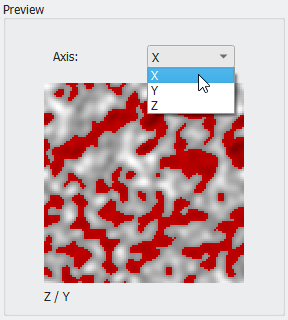
In the bottom right of the Stochastic Field Thresholding dialog a preview of the generated random field (gray values) and the segmentation result (red for Material ID 01) is displayed.
The preview is automatically updated when changing the values for the Domain, Generation Mode, and Thresholding parameters. The view direction can be selected from the pull-down menu for Axis.