4 Byte Float or Int File Formats
VOL files are 3D image data files with variable header length. GeoDict assumes VOL files to contain floating-point representations of 3D (or volume) images. The import dialog also offers the option to import integer values.
The order of parameters in the dialog is the same as in the RAW file format. As in the RAW file format, a file header may be present.
Unlike RAW files, 4 bytes are always used to represent the image, and these 4 bytes can be read as a floating-point number or an integer value. As with RAW files, the Header Size, number of voxels (NX, NY, and NZ), and Voxel Length are not contained in the file and must be entered in the Geometry Import dialog before importing.
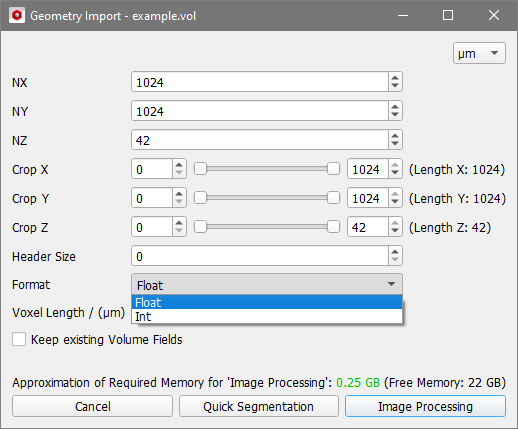
Some other software packages do not follow GeoDict’s naming scheme and produce VOL files containing integer values, typically 16-bit. If you have trouble importing VOL files and suspect that they contain integer data rather than floating-point data, try changing the Format option to Int (see the image above) and then importing the file.
Click Quick Segmentation to segment the image without image processing or click Image Processing to open the image in the 3D Image Processing dialog.
