Save Mesh
Save Mesh writes the currently loaded mesh to a file. When a surface triangulation is loaded, select Save Mesh and click Edit… to open the Save Mesh dialog.
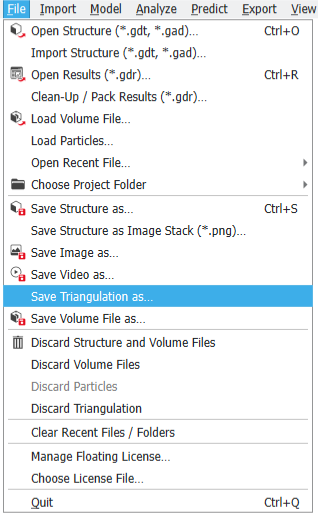
Save Mesh can also be reached via File → Save Triangulation as….
A dialog opens which allows to select the settings for the saved file.
 Result File Name
When saving a mesh, a result file is saved in the project folder and contains information about the selected parameters. Select the Result File Name (*.gdr) in the text box. The mesh files are also saved in the project folder.
|
File Format
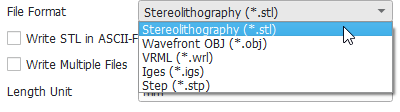
Select the File Format for the saved mesh.
The Stereolithography (*.stl), Wavefront OBJ (*.obj), VRML (*.wrl), Iges (*.igs), and Step (*.stp) formats can be exported natively by GeoDict. The third-party software CADLook, which was required for versions prior to GeoDict 2026 to export Iges and Step, is no longer necessary.
Parasolid (*.x_t) and Acis (*.sat) formats, which were supported prior to GeoDict 2026, can no longer be exported directly. To obtain these formats, first export the geometry from GeoDict as a VRML file and then convert it to the desired format using an external CAD tool.
|
Write STL in ASCII-Format
This option is only available when the *.stl file format is chosen. When Write STL in ASCII-Format is selected, the file is saved as human readable ASCII file. Otherwise, the STL file is saved in binary format. The binary files are smaller and much faster to read and write. Therefore, the ASCII format should only be used if necessary.
|
Write Multiple Files
This option is also only available when the *.stl file format is chosen. When the STL format is chosen and multiple meshes are currently loaded, these meshes can be saved to different files if necessary. This option is enabled with Write Multiple Files. For the other file formats, multiple meshes are always saved to one file.
|
Length Unit
The unit in which the data is saved to the file can be selected with Length Unit. GeoDict can handle all these available units, but most external software cannot. Therefore, the unit should be chosen depending on the software with which the mesh is further processed.
In the STL format, the information about the used unit is not contained in the file. The files for different units differ only in the order of magnitude of the data. Therefore, the unit should be chosen carefully based on your needs.
|