Fiber Options
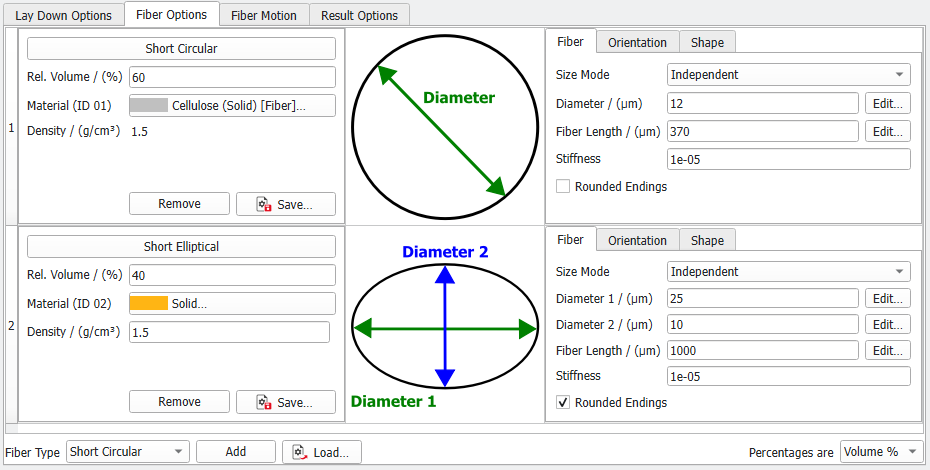
Define the geometrical properties of individual fiber type. The fibers for the generation of paper structures are organized and listed in three columns. In the left one define the Fiber Type, Percentage and Material together with it's percentage and material, the center one shows a cross-section of the chosen fiber type and in the right one you can edit the fiber parameters. In the bottom find the options to choose additional fiber types and how the fiber percentage should be given.
The fiber list is limited to short fibers of seven different fiber types.
Differences to PaperGeo Create
In PaperGeo Lay-Down, the center position of the cellulose fibers is a result of the lay-down process and cannot be specified.
An additional parameter in Lay-Down is the fiber Stiffness to be found under the Fiber tab. Values for Stiffness can vary from 0 to infinity. A high value indicates a stiff and inflexible fiber, while low values (such as the default 1e-5) indicate a pliable fiber that bends easily over other structures.
As a result of the lack of bending, a paper structure generated by laying down stiff fibers is thicker than a paper structure in which soft fibers are laid down. This side effect provides an additional way to control the thickness of the paper structure.
In the following examples, stiff or soft short-circular randomly curved fibers are laid down over a woven structure. All parameters are unchanged while the fiber Stiffness is set as indicated.
Observe that the sheet is thicker, and the domain is larger for the structure on the right, as side-effect of the higher stiffness of the fibers.
