Results
After the Open and Closed Porosity calculation is finished, the resulting files are saved in the project folder and a Result Viewer with the GeoDict result file opens automatically. The created GeoDict result file (*.gdr) contains five tabs. The computational results are shown under the Results tab, and can be loaded for visualization via the Data Visualization tab. The other three tabs (Input Map, Log Map, and Metadata) display additional information about the computation.
Find more details on the general functionalities in the Result Viewer user guide.
Under the Results - Report subtab, the Open and closed porosities table shows the Overall porosity and its decomposition into Open porosity and Closed porosity. Also, the total Number of pores which is the sum of Number of open pores and Number of closed pores is given.
Below, if more than one inflow plane was selected, a second table shows the Dead-end porosity and the Through porosity, as well as the Number of dead-end pores and the Number of through pores.
|
Note! All porosities are in volume percent and base on the total volume of the structure. |

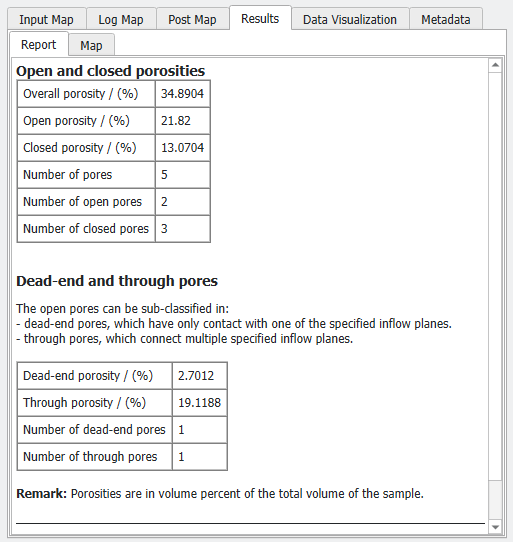
Open and Closed Porosity Results: |
|---|
|
