Crop
Crop a part of the structure in the selected direction by the (integer) values entered in X-, X+, Y-, Y+, Z-, and/or Z+.
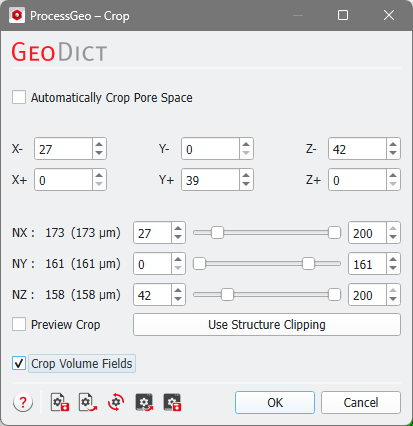
These values can be selected by moving the NX, NY, and NZ sliders or by entering the values directly. The first value determines what is cut away at the beginning of the structure. This value is identical to the value entered in X-, Y-, and Z- respectively. The second value determines the end of the cropped structure. It is equal to NX minus X+, NY minus Y+, and NZ minus Z+, respectively.
Checking Automatically Crop Pore Space results in removing slices of the 3D model at the boundary that contain only a Material ID that has been assigned as pore space. In this case, the previously shown settings cannot be selected.
With Preview Crop checked, the result of the cropping process is previewed in the Visualization area. The Use Structure Clipping button allows to copy the current structure clipping (from the current visualization) as input parameters for cropping.
By checking Crop Volume Fields, any loaded volume fields are also cropped to the new geometry size during the cropping operation.
The structure’s analytic information is preserved during cropping, as indicated by the green dot in front of GAD Objects in the project status section. It is possible that some objects lie completely outside of the domain after the cropping. Nevertheless, they are not discarded, and the object information is still stored in the structure file.
