|
Navigation: GeoDict 2026 - User Guide > Simulation & Prediction > SatuDict > Capillary Pressure Curve > Options |
Scroll |
Constituent Materials
All material properties of invading and displaced fluid can be defined in the Constituent Materials tab.
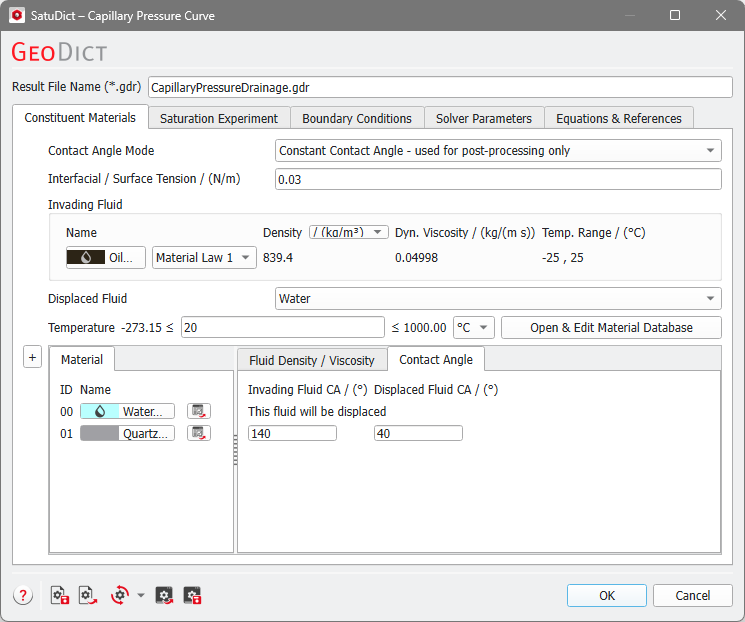
Three options for the Contact Angle Mode are available:
|
Enter the Interfacial / Surface Tension in N/m between the invading and displaced fluid or use the (standard edition) default value of 0.07275 N/m corresponding to the surface tension between water and air at 20°C. For the Oil and Gas edition, the default value of 0.03 N/m corresponds to the surface tension of oil and water at 20°C. |
The Invading Fluid invades the current structure and displaces the Displaced Fluid. The invading fluid can be selected through the Material Selector dialog box, by clicking on the button for the material. The pull-down menu gives access to selecting the desired material from the GeoDict Material Database. When none of the materials available in the database fit the preferred specifications, Manual should be chosen. Alternatively, a new material with the desired specifications can be added to the Material Database (see the Material Database chapter). 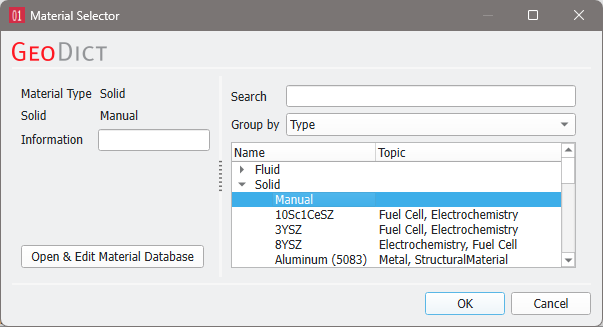 To match realistic material colors for visualization in a certain application, the default material colors can be changed through the Color & Visibility tab of the GUI sidebar. For more visualization options, see the Visualization chapter. |
The Displaced Fluid must already be present in the model of the structure currently in memory. Choose the displaced fluid from the drop-down menu. To change the fluid to another one, select a different fluid in the Material panel below. The changes apply automatically to the selection in this menu. 
|


 Material, Fluid Density / Viscosity and Contact Angle
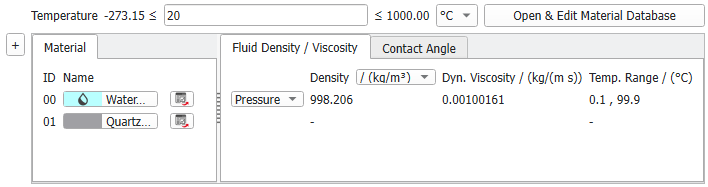 Set the Temperature applied for the calculation in the selected units below. Click Open & Edit Material Database to edit the material properties in the Material Database if needed. Underneath, the Material panel contains the Material IDs of the constituent materials present in the current structure. By default, Material IDs that are not present in the structure are not displayed under the Material tab, but they can be displayed by clicking on the “+” symbol to the left of the Material tab. Click on the name of a material to change the material of the corresponding Material ID in the Material Selector as explained above for Invading Fluid. Click the Material Report button 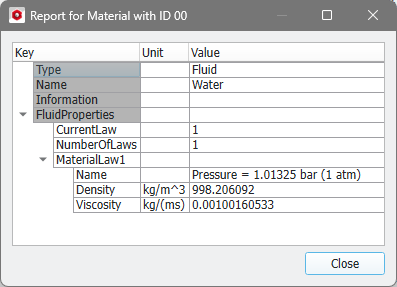 In the Fluid Density / Viscosity panel you can see the physical properties density and viscosity of the fluids in the structure. If available, you can select between different material laws. For manual materials, define their properties directly in this panel. 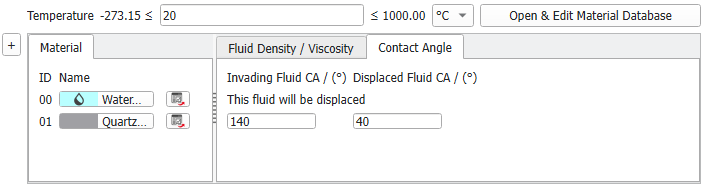 In the Contact Angle panel, enter the contact angle for all solid materials (after choosing Constant Contact Angle as Contact Angle Mode) or for each solid material separately (after choosing Multiple Contact Angle or True Contact Angle as Contact Angle Mode). For fluids, it will be displayed if it has a role in the simulation, e.g., in this simulation Water will be displaced. The Invading Fluid CA (Contact Angle) and the Displaced Fluid CA values add up to 180° and they are adjusted automatically when changing one of the two values. For a given solid material phase, the fluid with a contact angle smaller than 90° is wetting and the other fluid (with contact angle larger than 90°) is non-wetting.
|
 to see the relevant parameters for the material.
©2026 created by Math2Market GmbH / Imprint / Privacy Policy
