Options
The Capillary Pressure Curve dialog opens when clicking the Edit… button and includes the Constituent Materials tab, the Saturation Experiment tab, the Boundary Conditions tab, the Solver Parameters tab, and the Equations & References tab, which cites several references.
At the top of the dialog, enter the Result File Name (*.gdr). The result file is saved in the chosen project folder (File → Choose Project Folder in the menu bar).

The built-in default icon comes with a selection of different presets. Clicking on the little arrow shows several additional preset options.
The usual built-in default settings will load the settings according to the current GeoDict edition. You can change the current GeoDict edition from the Settings menu as described in the Graphical User Interface chapter.
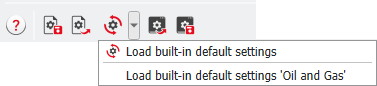
In SatuDict - Capillary Pressure find edition-specific presets for the Standard Edition and the Oil and Gas Edition.
In the Oil and Gas edition, the default Invading Fluid is changed from Water to Oil, which means that the surface tension is adjusted accordingly. In the Solver Parameters tab, the Step Size is reduced from 2 to 1.
Tabs of the Capillary Pressure Curve dialog |
|---|
|
