Boundary Conditions
The Boundary Conditions tab is divided into two groups: Domain Boundary Conditions and Minimum Pressure of Interest.
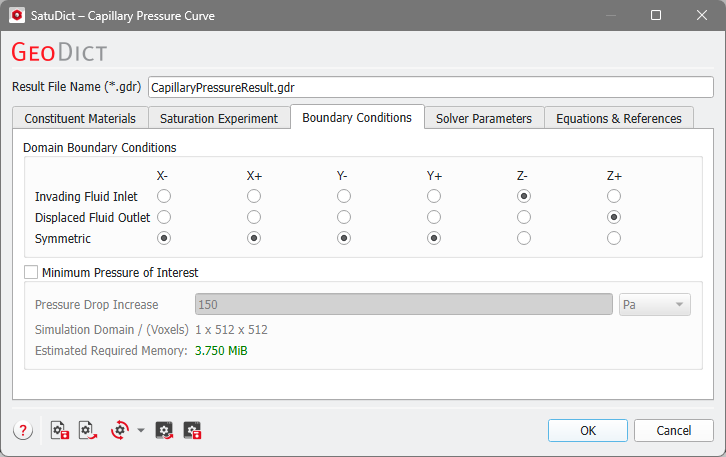
Domain Boundary Conditions
Define if a side of the sample (X-, X+, Y-, Y+, Z-, and Z+) is the Invading Fluid Inlet or the Displaced Fluid Outlet. The Invading Fluid Inlet are the domain sides where the invading fluid can enter the domain from a reservoir, while the Displaced Fluid Outlet are the domain sides where the displaced fluid can leave the domain.
If a side is not connected to a reservoir, e.g., if the porous medium continues in that direction, select Symmetric boundary conditions in these directions, i.e. the pore structure is mirrored at this side.
In some cases, depending on the choices in the Saturation Experiment tab, the boundary conditions are grayed out and cannot be edited, e.g., if there is no invading fluid reservoir. Then, symmetric boundary conditions are used.
Minimum Pressure of Interest
By checking Minimum Pressure of Interest, the size of the original simulation domain (voxels) is artificially increased in the direction(s) of the flow (here Z). The effect is to improve the capillary pressure results at least down to the desired value, by increasing the structure size such that a sphere, corresponding to the minimal pressure, fits into the whole structure. The cost for this increased accuracy is that it is increasing the memory requirements for the calculations as well.
The size of the increased Simulation Domain (in voxels) and the Estimated Required Memory for this are shown.

