Data Visualization
Under the Data Visualization tab, the .gdt and .hht files, corresponding to the saturation levels computed, can be opened, as explained in the ConductoDict chapter. No files are available if Discard PDE Solver Files was checked in the Solver settings tab.

For each selected Computational Direction the solution files for the saturation steps with non-zero conductivity are saved and can be loaded by clicking on the Load .gdt and .hht button.
In the structure file (.gdt) you can observe the fluid distribution, while the .hht (homogenized heat) file contains the potential values at each voxel.
Select Structure to load the original structure which is saturated with the displaced fluid. No additional .hht file will be loaded.
Select Structure__z to load the reference solution (needed to calculate the Resistivity Index), where the structure is fully saturated with Water (Brine).
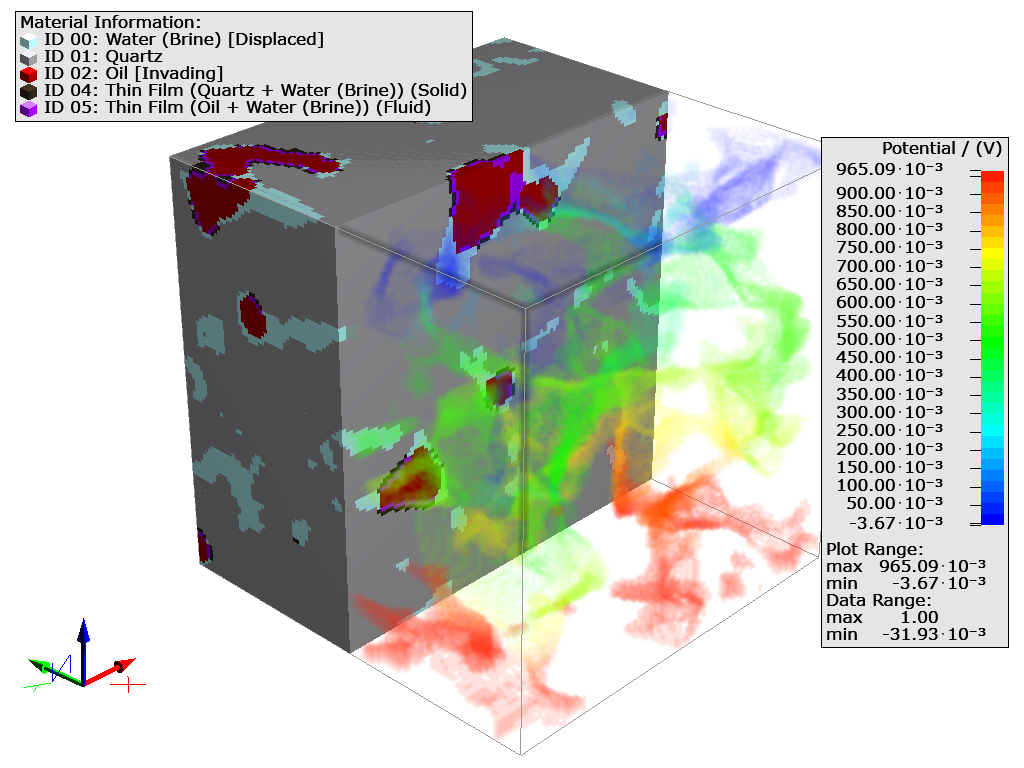
Shown below is the .gdt file for a 51% invading fluid saturation level. The solid phase (Quartz) is shown together with the Displaced fluid (Water) and the Invading Fluid (Oil). The right part of the image shows the potential field of the Water with transparent effect on the clipped structure model.
More information about the visualization parameters is available in the Visualization chapter.
