Boundary Conditions
The Boundary Conditions tab contains four panels: Computational Directions, Boundary Conditions in Heat (or Potential) Flux Direction, Experiment Input, and Boundary Conditions in Transverse Directions.
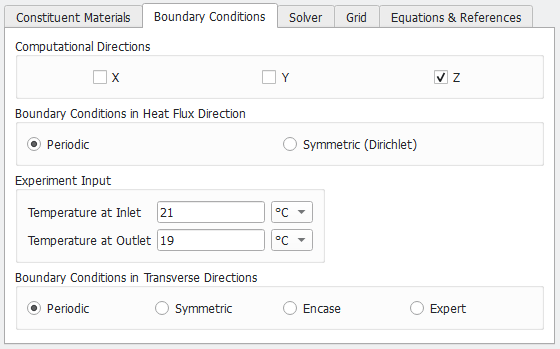
For the Computational Directions, choose the direction for the conductivity to be computed.
To obtain the whole 3x3 conductivity tensor (for each direction) in the result file, it is necessary to choose all three directions. Checking all directions prolongs the computational time of the solver.
The choice of Boundary Conditions in Heat Flux Direction depends on the morphology of the structure and the field of application. 
If Periodic is selected, the conductivity is computed assuming that the structure is periodically repeated in the flux direction. If Symmetric (Dirichlet) is checked, constant temperature or potential is assumed along both border planes in the heat flux or the potential flux direction. For non-periodic structures, Symmetric (Dirichlet) boundary conditions give more accurate results than Periodic boundary conditions.
For most applications, the difference between these two cases is insignificant and can be compared with a computational error.
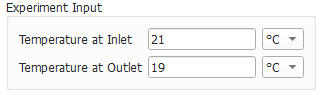
An arbitrary temperature can be set as boundary conditions in the Experiment Input panel to define the temperature difference or the potential difference across the material structure.
Besides the boundary conditions chosen for the main conduction direction, the Boundary Conditions in Transversal Directions can also be chosen to be Periodic, Symmetric, Encase, or any combinations of those boundary conditions in two tangential directions with the choice of Expert.

With Periodic boundary conditions, the structure is repeated in the tangential directions. With Symmetric boundary conditions, the structure is flipped and then repeated.
In both cases, the numerical solution can be computed without flipping or repeating the structure in memory. Therefore, the memory and runtime costs for all boundary conditions are comparable.
When Encase is chosen, the structure is encased by two non-conducting plates added in the two tangential directions.
Choose Expert when different boundary conditions need to be specified for the two tangential directions. When Expert is checked, more choices appear.
For each selected computation direction, the boundary conditions in the two transverse directions must be selected. For each tangential direction, you have the choice of Periodic, Symmetric, Encase, and Encase (fixed domain size).
When Encase is used, the solver internally adds a one-voxel layer in the required direction and solves with periodic boundary condition. That effectively is equivalent to solving the structure with casing in two ends in the direction of interest. So, the size of computation in this direction becomes n+1. However, if changing the computational size is not preferable, using Encase (fixed domain size) can avoid that, then the first layer of the structure is replaced by a non-conducting material.
