Orientation
All objects in the generated structure have either isotropic or anisotropic orientation. The Orientation of an object type in a generated structure can be set by clicking the Edit… button. The orientation can be separately set for each object type so that differently oriented objects may coexist within the same structure.
In the Orientation dialog, objects can be defined to be Isotropic, have a certain Anisotropic Direction, Anisotropic Orientation, Given Directions, to be oriented In XY-Plane or have a maximum Angle Around Direction.
For all object types, it is possible to control the object direction (isotropic or anisotropic) and the position of the cross-section with respect to the XY-plane as well.
Isotropic
In an Isotropic orientation, all directions have the same probability.
Anisotropic Direction
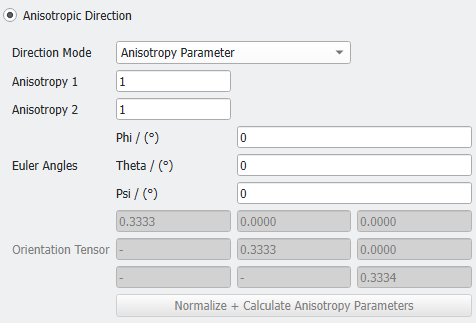
When checking Anisotropic Direction and selecting Anisotropy Parameter from the Direction Mode pull-down menu, the Anisotropy Parameters (Anisotropy 1 and Anisotropy 2), as well as the Phi, Theta and Psi Euler Angles for the three-dimensional rotation of anisotropic objects can be defined.
In this case, the positions of cross-sections to the XY-plane are isotropic (and not entered).
Anisotropic Orientation
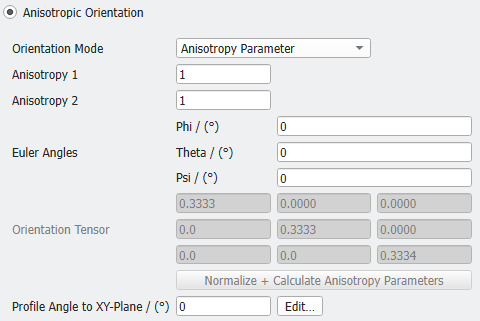
To control not only the object direction, but also the position of the cross-section with respect to the XY-plane, check Anisotropic Orientation and select either Anisotropy Parameter or Orientation Tensor from the Orientation Mode pull-down menu. Since all other parameters are the same as for the Anisotropic Direction, here only the Profile Angle is described.
Given Directions
By checking Given Directions, a distribution gradient can be entered for different direction vectors for the objects in the generated structure.
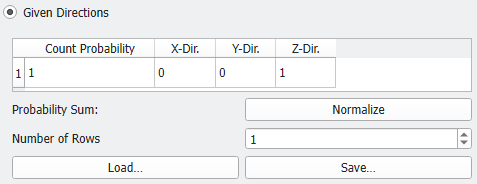
 Table: Count Probability and Number of Rows

In XY-Plane
By checking In XY-Plane, the angle of the objects main axis in the XY-Plane can be set. The objects lie in the XY-Plane and their main axis orientation in relation to the X-direction is controlled by the entered value. The Angle in XY-Plane can be set to be a Constant value, or to follow a distribution (Uniformly in interval, Gaussian, or Probability Distribution).
Angle Around Direction
If Angle Around Direction is checked, define the Main Direction Vector of the objects generated in the structure. The orientation of the objects can vary if an Angle Around Direction is given.
The Angle Around Direction defines the maximum angle the object orientation varies from the Main Direction. The Angle Around Direction can be set to be a Constant value, or to follow a distribution (Uniformly in interval, Gaussian, or Probability Distribution).
