|
Navigation: GeoDict 2026 - User Guide > Material Modeling > FiberGeo > Create Fibers > Options > Fiber Options |
Scroll |
Fiber Type and Percentage
For all fibers, the left column of the panel contains the name of the fiber type, the fiber percentage in the structure, and the material.
Whether the Fiber Thickness is given by Diameter or Dtex (decitex: textile unit of measure of fiber weight, 1 Dtex= 1 g/10000 m) is chosen from the pull-down menu. The fiber parameters in the panels are automatically adjusted depending on this choice. The use of Dtex requires knowing the material density in g/cm3. For the database materials the density is automatically given. For manual materials enter the density in the fiber type panel on the left. If the choice of Fiber thickness given by is changed from Diameter to Dtex, the fields Diameter, Diameter 1 and Length 1 fields transform into Dtex fields in the Fiber parameters panel on the right. The values are automatically recalculated. The calculation of the Dtex value does not only depend on the diameter / diameter 1 / length 1 but also on the other parameters describing the cross-section of the fiber, for example the Inner Diameter Fraction for hollow fibers: |
 Adding and removing fiber types
Short Cellulose and Short Elliptical are the two default Fiber Types. At the bottom left of the dialog box, clicking Add inserts other fiber types chosen from the Fiber Type pull-down menu (Short Circular, Infinite Cellulose, Infinite Rectangular, etc.). Fiber types can be discarded by clicking Remove in the left column for that fiber type.  Clicking on the fiber type name minimizes the object panel, and clicking on it again when minimized, expands it. A scroll bar at the right allows to navigate up and down in the list of chosen fiber types. The settings for a fiber entered in the fiber type and the fiber parameters panels can be saved with all its options by clicking Save… and later reloaded by clicking Load… |
The percentage of a certain fiber type can be specified as Count %, Volume %, or Weight %, as selected from the pull-down menu at the bottom right of the dialog box. Note that, if the Weight option is chosen, the material density must be provided (or it is taken from the GeoDict material database). 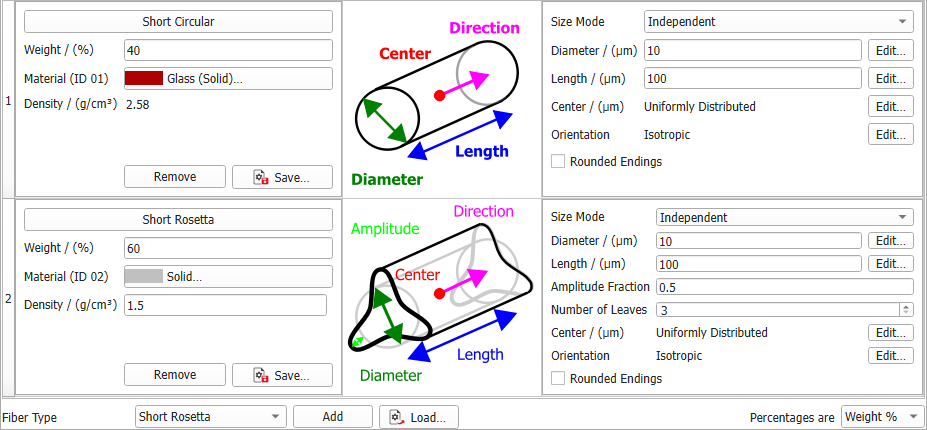 If Fixed Object Number or Object Volume Percentage is chosen as Stopping Criterion and percentages are set to volume, the Absolute Volume is given below the relative volume. |
Material designates the constituent material assigned to the fiber type used in the paper structure. Clicking on the material gives access to selecting the desired material from the GeoDict Material Database. When none of the materials available in the database fit the preferred specifications, Manual should be chosen. To match realistic material colors for visualization in a certain application, or to distinguish the constituting materials more easily, the colors of the materials can be changed through Settings → Color & Visibility Settings in the Menu bar, or by unfolding the Color & Visibility sidebar next to the GeoDict visualization area as described in the Visualization User Guide. |
The material Density (g/cm3) appears for the fiber types if at least one of the following criteria is matched:
For materials included in the GeoDict Material Database, the density is automatically entered. For manual materials the density must be entered manually. The fiber Density, given in g/cm3, is an intrinsic property of the selected fiber type, affecting the final weight of the fibrous structure. The density of fiber is intimately related to the Grammage (g/m2) of the created fiber structure. When denser fibers are used, and the grammage is unchanged, less fibers of this type appear in the fiber structure. Vice versa, when the same fiber type is used but an increase in grammage should be achieved, the structure must contain more fibers. |
©2026 created by Math2Market GmbH / Imprint / Privacy Policy
