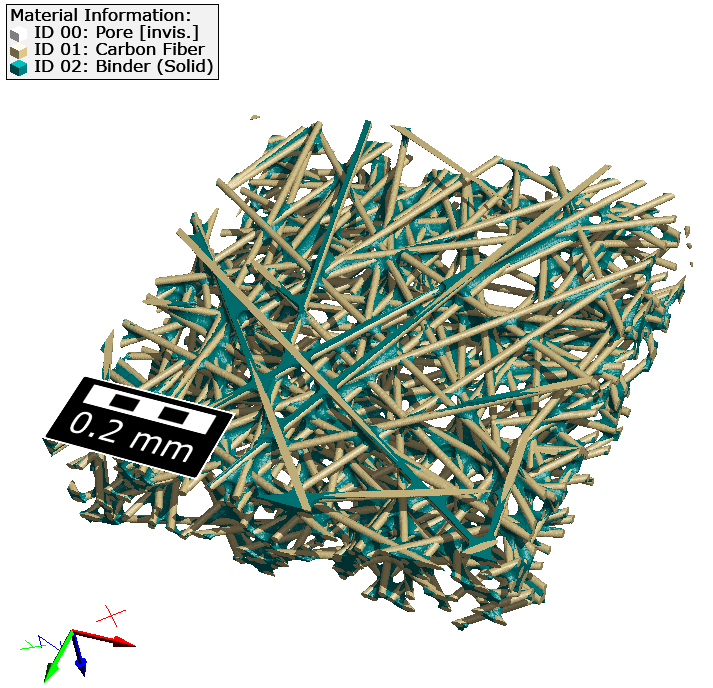
Gas Diffusion Layer
The Gas Diffusion Layer app creates a gas diffusion layer of a PEM fuel cell.
|
Modules needed to run this GeoApp: FiberGeo |

Parameters
Clicking Edit opens the Gas Diffusion Layer parameters dialog.
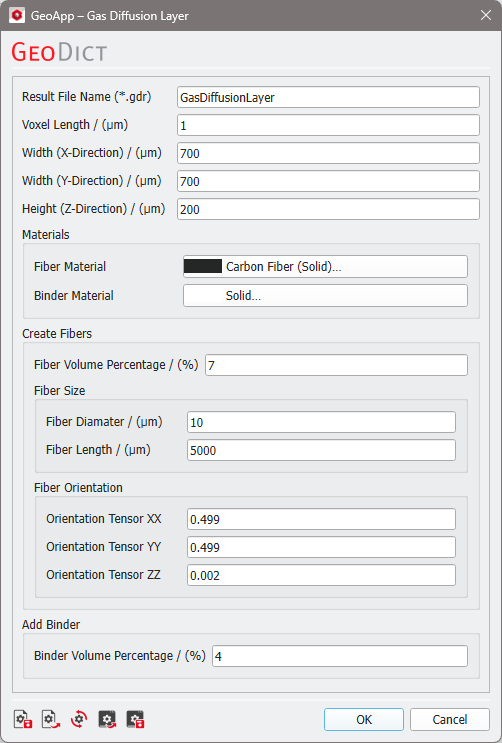
Enter a Result File Name for the generated result file (*.gdr) and the corresponding result folder.
Set the domain parameters in µm using the parameters Voxel Length, Width (X-Direction), Length (Y-Direction), and Height (Z-Direction).
Select Materials for the fibers and the binder from the GeoDict material database.
The gas diffusion layer consists of short circular fibers. In the Create Fibers panel define the Fiber Volume Percentage and set the Fiber Diameter and Fiber Length of the generated fibers. Define the Fiber Orientation by giving the diagonal of the orientation tensor. The three entries are normalized by the GeoApp.
Finally, define the Binder Volume Percentage.
Results
Clicking Run creates the diffusion layer and saves the structure file in the result folder.