Shift GAD Objects
The Shift GAD Objects command allows to modify the current 3D structure by shifting each individual object in a fixed direction.
After selecting Shift GAD Objects from the pull-down menu, and clicking the Edit… button, the Shift GAD Objects dialog opens.
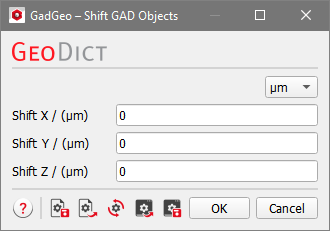
At the top right, you can change the unit.
Enter the desired Shift in X, Y, and Z direction for the objects in the structure and click OK to return to the GadGeo section. Click Run to move the objects in the structure away from the Cartesian axis origin by the given distance.
Observe the shift of the structure by 50 µm in the negative Y-direction. Objects may be (partially) shifted outside of the domain.
