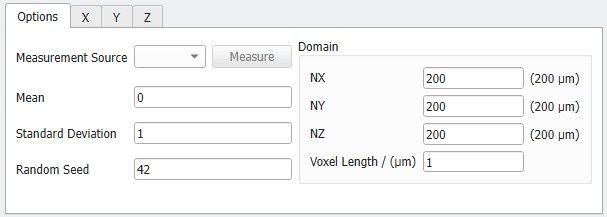
Options
The geometric properties of the desired random field are accessible under the Options tab. The parameters are grouped in the parameters defining the general randomness and the Domain parameters.
Randomness Parameters
 Measurement Source
If a volume field is loaded, a Measurement Source can be selected. This is useful, for example, if a scan with a random field-like structure should be reproduced with a different realization of the same statistical properties. Clicking Measure then computes the autocorrelation for the volume field values and adds the corresponding graph in the X, Y, and Z tabs as Measured Covariance. In the Options tab the Mean value and the Standard Deviation of the selected field are also entered automatically.
If the volume field is not given in the right data type and thus does not show up in the pull-down menu, it can be transformed. Therefore, right-click on the field in the Project Status and select Math Operation.
In the Math Operation dialog select Convert to Data Type from the first and Float Single-Precision from the second pull-down menu.
|
Mean value and Standard Deviation
To generate a new custom random field, enter the desired Mean value and Standard Deviation manually. These values correspond to the generated random field and define the value range in it.
In the following observe how the data range changes for different mean values and standard deviations while all other parameters are kept the same.
|
Random Seed
Random Seed initializes the random number generator behind the field generator. Changing its value produces different sequences of random numbers and hence, different realizations of the specified random field. If all settings are equal, generating with the same Random Seed value produces the identical random field. Random Seed must be a non-negative integer number.
|
Domain Parameters
The Domain panel contains the parameters defining the structure size (NX, NY, and NZ) in combination with the resolution (Voxel Length).
NX, NY, and NZ are the number (N) of voxels in X, Y, and Z directions.
The Voxel Length is the size of one voxel in the chosen units. Varying the values for NX, NY, and NZ has the effect of changing the size of the structure in the given direction.
Low values for Voxel Length in combination with high values for NX, NY, and NZ increase the resolution, but also increase computational time. After setting the values of NX, NY, NZ, and Voxel Length, the physical structure size is automatically displayed in the chosen units.
If a scan should be statistically reproduced, use the same voxel length here.