The general properties of the packed structure are entered under the Pack Options tab. These parameters are grouped into the panels Packing Mode, Domain, Materials, Packing, Analysis, and Parallelization.
Packing Mode
From the Packing Mode pull-down menu, select to Create New Packing or to Re-Compact Existing Packing.
 Create New Packing
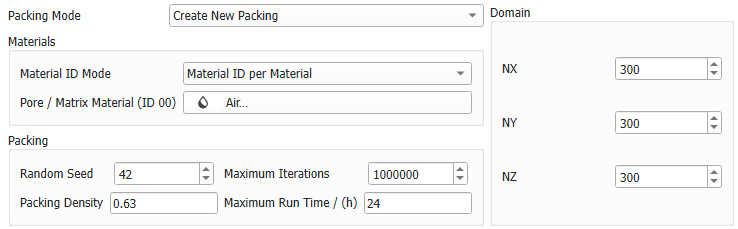
The spheres are packed into a new structure. The available parameters for the generation are listed and explained below for the panels Materials, Packing, and Domain..
|
Re-Compact Existing Packing
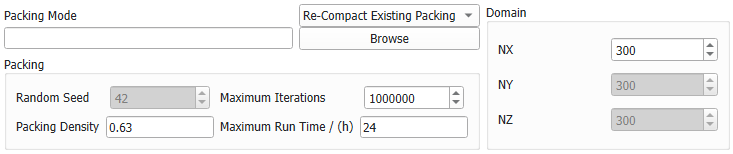
Re-Compact Existing Packing is useful when trying to achieve a higher packing density from an already existing packing result.
When choosing this option, the Materials panel is missing but some Packing and Domain parameters under the Pack Options tab can be set.
Choosing to re-compact an existing packing enables to Browse and load the GDR result file from a previously run packing process. This GeoDict result file, and corresponding result folder, already include the packing parameters.
Under the Sphere Distribution tab, all parameters are directly entered from the selected GDR file and from the corresponding result directory of a previous GrainGeo run. Additionally, you can choose to Apply Gravity.
|
Domain
In the Domain panel, enter the values for NX, NY, and NZ, indicating the number of voxels that the packed structure should have in the X, Y, and Z-direction, respectively.
Change NX, NY, and NZ by direct insertion or by clicking the arrow buttons. The voxel length is automatically set according to the needs for the sphere distribution.
When Re-Compact Existing Packing is selected, only NX can be changed.
Materials
Define the materials in the structure. This is part of the GeoDict Material Database concept, in which objects and pore space in the structure are ascribed to an individual material (e.g., glass, iron, PET, air,...) with specific physical properties.
The panel does not appear when Re-Compact Existing Packing is selected. Then, the materials from the existing packing are kept.
Material ID Mode
The pull-down menu allows selecting between applying the Material ID based on the materials or the types of objects present in the packed structure.
By leaving the default Material ID per Material, sphere types of the same material (defined in the Sphere Distribution tab) are assigned the same Material ID.
Changing it to Material ID per Object-Type allows assigning different Material IDs to the spheres based on their size (diameter) while keeping the same material.
By clicking the button to the right of Pore / Matrix Material (ID 00), it is possible to change the Material ID assigned to the pore space / matrix surrounding the objects in the structure from the default Air (Fluid) to any other material.
|
Packing
Define the parameters for the packing algorithm.
For Re-Compact Existing Packing the parameter random seed is not available.
Random Seed
The Random Seed is a non-negative integer number that defines the random initial position of the spheres. Changing its value produces different sequences of random numbers and, hence, different realizations of the specified structure. If all settings are equal, generating with the same Random Seed value produces exactly the same structure.
|
Packing Density
For Packing Density enter values between 0 and 1 (0% to 100% packing density).
|
Maximum Iterations
The parameter Maximum Iterations allows setting an upper limit to the number of steps for the packing process.
|
Maximum Run Time
The Maximum Run Time (h) permits setting the upper time limit for the packing process.
|
Analysis
Define which result files should be created and which post-processing should be applied.
Save GeoDict Particle Trajectories for Animation of sphere motion (*.gpt File)
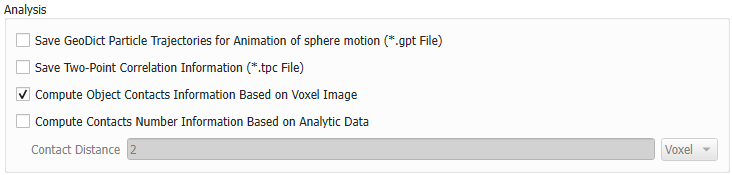
Checking Save GeoDict Particle Trajectories for Animation of sphere motion (*.gpt File) creates a file containing the sphere trajectories during the packing process. The particle trajectory file can be loaded for visualization. Since saving the sphere trajectories results in a significant slowing down of the packing process, while the files are opened and trajectories for every sphere are saved, there is no need to select this option unless knowing the trajectories is essential for the project.
|
Save Two-Point Correlation Information (*.tpc File)
Checking the box Save Two-Point Correlation Information (*.tpc File), creates the two-point correlation file inside the results folder in the project folder.
|
Compute Object Contacts Information Based on Voxel Image
If Compute Object Contacts Information Based on Voxel Image is checked, GeoDict counts the number of sphere-to-sphere contacts by checking if a voxel belonging to one sphere is in direct face-to-face contact with a voxel belonging to another sphere. This is reported as Voxel Contacts under the Results - Report subtab of the Result Viewer of the GDR result file, after the packing process has run.
|
Compute Contacts Number Information Based on Analytical Data
If Compute Contacts Number Information Based on Analytical Data is checked, GeoDict counts the number of sphere contacts based on the given Contact Distance. Thus, contacts are also found for objects that do not touch but have a distance smaller than the given contact distance. This is reported as Analytic Contacts under the Results - Report subtab of the Result Viewer of the GDR result file, after the packing process has run. The contact distance can be given in Voxel or the unit given in the top right corner of the dialog.
|
Parallelization
Parallelization Options
Control how many threads are used for the computation. Parallelization is possible if your license and hardware allow it.
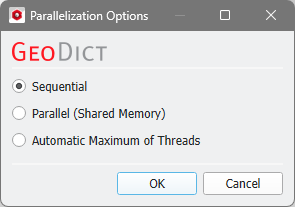
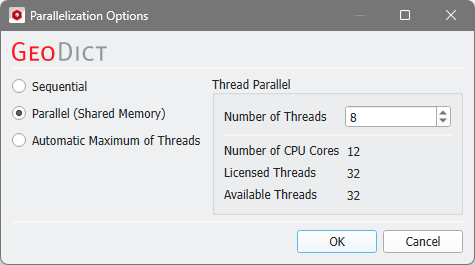
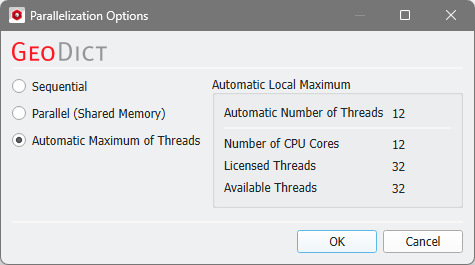
The Parallelization Options dialog opens when clicking the Edit button and you can choose between Sequential, Parallel (Shared Memory), or Automatic Maximum of Threads.
Selecting Sequential will not apply parallelization and only one thread is used for the computation.
When Parallel (Shared Memory) is selected, the Number of Threads can be entered. Below, the Number of CPU Cores that the current machine has, the maximum number of Licensed Threads and the number of those licensed threads that are available (Available Threads) are shown in the dialog. Of course, the maximal number of parallel processes you can use, is the smallest of those three numbers.
If Automatic Maximum of Threads is selected, the number of parallel processes is automatically selected for optimal speed, based on the CPU cores and licensed parallel processes.
The Automatic Local Maximum of processes is automatically selected, which is the minimum of Number of CPU Cores, Licensed Threads, and Available Threads.
|