Results
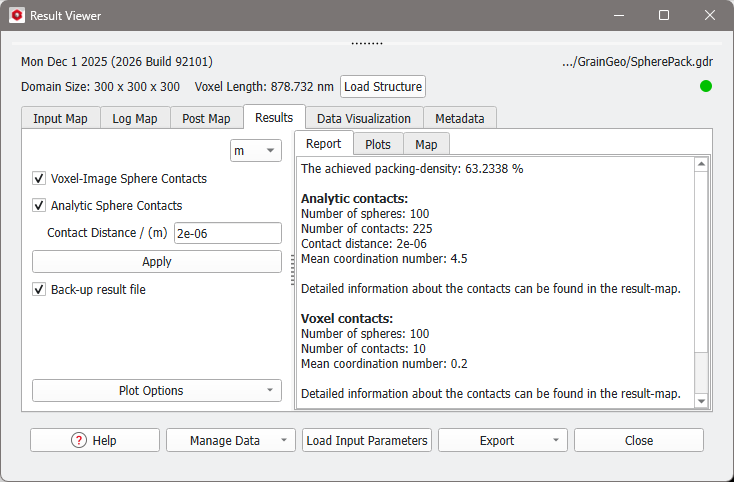
After generating analytic spheres the corresponding GeoDict result file (*.gdr) is opened in the Result Viewer automatically.
Besides the result file, a result folder with the same name is created. In this directory, GrainGeo saves files from the packing or piling run in the several formats. Some of these formats are optional and only saved if the corresponding checkbox in the Analysis panel of the Pack Options or Pile Options tab is checked.
Information on the analytic and discretized (voxelized) sphere contacts is internally and automatically saved and appears in the Result Viewer of the result file (*gdr) under the Results – Report and the Results – Map subtabs. This includes such information as the contact distance, mean coordination number, the number of contacts, and a list of all sphere contacts.
 Report
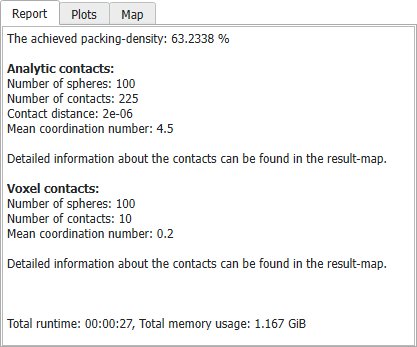
Under the Results - Report tab you can always find the achieved packing density at the top.
Afterward follow the Analytic contacts and the Voxel contacts, if they were selected in the Analysis panel in the Pack Options or Pile Options tab. They can also be enabled or disabled after the structure generation via the post-processing panel on the left.
The Mean coordination number is the mean number of neighboring spheres that any sphere touches. It is computed as 2x the total Number of contacts divided by the total Number of spheres. Each contact needs to be counted twice, once for each sphere which participates in this contact.
|
Result Map
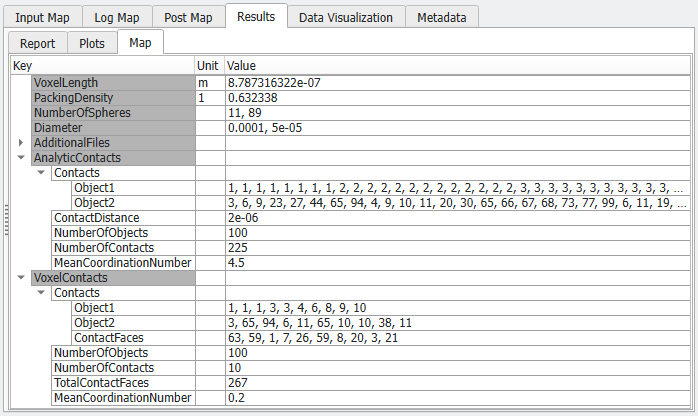
In the Results – Map subtab, detailed information about each contact can be found:
- Under the AnalyticContacts key, the index numbers of the two objects that are in contact with each other are shown.
- Under the VoxelContacts key, the index numbers of the two objects that are in contact with each other, and the number of contacting voxel faces of each contact is shown.
|
Plots
Under the Results - Plots tab two plots can be found.
The Convergence plot shows the packing density achieved by the algorithm over time.
The Sphere distribution tab compares the realized distribution with the desired distribution entered in the Sphere Distribution tab.
|
Post-Processing Panel
In the post-processing panel on the left, decide if the Voxel-Image Sphere Contacts and the Analytic Sphere Contacts should be shown or not. For analytic sphere contacts additionally, the Contact Distance must be given in the selected unit.
The post-processing is applied after clicking Apply. This changes the result file, but if Back-up result file is checked, the original result file is backed up in the result folder as described in the Result Viewer User Guide.
If Compute Contacts Number Information Based on Analytic Data is checked, GeoDict counts the number of sphere-to-sphere contacts by checking if the distance between the center points of the spheres is large enough. For numerical reasons, it is highly unlikely that two spheres will exactly touch each other. Rather, there will always be a small distance between them.
For example, with a given Contact Distance of 0.5 µm, a sphere of diameter 20 µm is defined to be in contact with a sphere of diameter 10 µm, if the distance between their center points is less than 15.5 µm.
The chosen Contact Distance can be changed during post-processing. Smaller contact distances lead to less contacts found.
|
Data Visualization
If Save GeoDict Particle Trajectories for Animation of sphere motion was checked in the Analysis panel, in the Result Viewer under the Data Visualization tab the particles and their trajectories can be loaded.
In the View Controls uncheck Structure and go to the Particles tab to visualize the particles movement during the packing process until they reach their final position by clicking Play or moving the slider for Time. Learn more about particle visualization settings in the Visualization User Guide.
|
Result Folder
The result folder contains the following files:
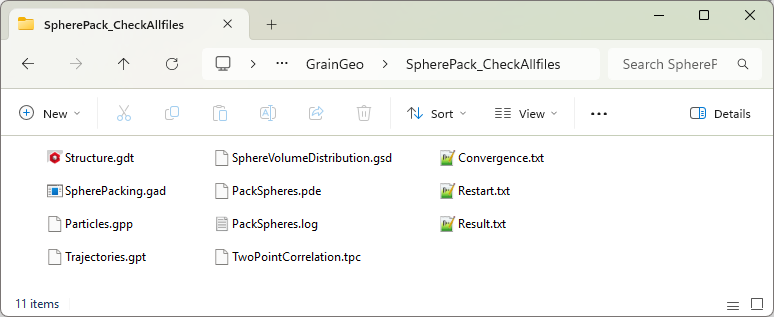
- Structure.gdt file containing the GeoDict 3D voxelized geometry and the analytic data of the object packing.
- SpherePacking.gad (GeoDict analytic data) files contain the analytic data about the geometry of the object packing, such as object Material ID, object type, object position, and (sphere) diameter.
- optionally saved results (choose to save them in the Analysis panel)
- Trajectories.gpt (GeoDict particle trajectory) files contain a record of the movement of the spheres during the packing (or piling). This file can be used to visualize the packing process.
- Particles.gpp (GeoDict particle position) files contain information on the position of the spheres after the packing (or piling).
- TwoPointCorrelation.tpc (two-point correlation) file contains a list with the distances between all spheres.
- Convergence.txt relates the convergence at a given time with a certain packing-density.
- Restart.txt contains information about the sphere distribution parameters to re-start the packing process.
- Result.txt contains the achieved packing density, which is set to zero for the piling process.
- PackSpheres.log contains the chronological record of the packing process.
- PackSpheres.pde is a parameter file that contains the input data for the external packing code.
- SphereVolumeDistribution.gsd (GeoDict sphere distribution) contains the diameter, probability and number of each distinct sphere type, which can also be found in the Map tab of the Result Viewer.
|