Pile Analytic Spheres
Use Pile Analytic Spheres to pile analytical spheres in Z-direction.
The parameters for the piling are organized in the Pile Options and Sphere Distribution tabs.
Many of the Pile Options to pile analytic spheres are similar to the options shown for Pack Analytic Spheres.
The options are the same for:
- the Units and Result File Name above the different tabs,
- the Materials and the Analysis panel under the Pile Options tab,
- the Sphere Distribution tab is identical, except, that for pile analytic spheres, there is no option to apply gravity, because the piling process already applies gravity.
The results are also very similar to those from sphere packing.
In the following the Domain and Piling panels are described, which are different or not available for the sphere packing.
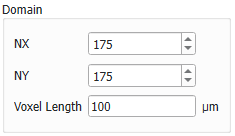
 Domain
The Domain value for NX and NY can be chosen by direct insertion or by clicking the arrow buttons, to indicate the number (N) of voxels in X- and Y-direction.
Since the spheres fall in Z-direction, the size value for Z is determined by the height of the pile of spheres and depending on the number of spheres to be piled.
In the Voxel Length box, enter the length of the voxels in the selected units.
|
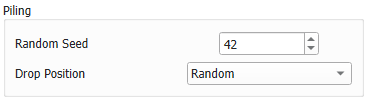
Piling
In the Piling panel, the Drop Position from Center or Random can be selected from the pull-down menu.
When selecting Center, the spheres are dropped from the center of the X-Y plane, instead of being dropped from any random position on the plane.
In the example below observe how the spheres are placed after another for random and center drop position. The visualization is done with particles as explained in the Results section.
|