Add Surface Grains roughens the surface by adding grains on the surface of the Material ID selected with Roughen Material ID.
The added grains get the next free Material ID and the overlap between the added grains and the Roughen Material ID is defined following the rules described for Intersecting Material IDs in the Graphical User Interface User Guide.
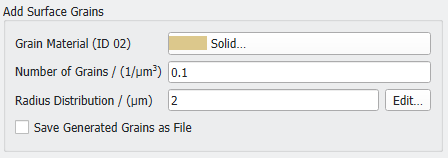
Choose a Grain Material for the added surface grains from the material database. The next available Material ID is assigned to the grains and the material of the grains can be selected from the database after clicking the button. For example, if the structure contains one material with Material ID 01, the grains are assigned to Material ID 02.
The parameter Radius Distribution defines the size of the grains added to a certain material in the domain.
By clicking the Edit... button, the Radius Distribution of the grains can be set to be a Constant value, or to follow a distribution (Uniformly in interval, Gaussian, Probability Distribution, or Log-Normal).
Observe the effect of always adding grains (0.1 /µm3) of different radius (1.5 µm, 2 µm, or 2.5 µm) to the cube.
When Save Generated Grains as File is selected, the added surface grains are saved as SurfaceGrains.gad structure file in the result folder. This file contains the grains’ analytic data.
As a simplified example, observe the addition of grains with radius 2 µm to objects (box and sphere) with different Material IDs. The grains are added in two steps, first to Material ID 01 (box), and then to Material ID 02 (sphere).
The Number of Grains added is 0.1 grains/µm³ (1 grain for every 10 µm³ of the domain).
 Save Generated Grains as File