Results
After the Euclidean Distance Transform calculation is finished, the resulting files are saved in the project folder and a Result Viewer with the GeoDict result file opens automatically. The created GeoDict result file (*.gdr) contains five tabs. The computational results are shown under the Results tab, and can be loaded for visualization via the Data Visualization tab. The other three tabs (Input Map, Log Map, and Metadata) display additional information about the computation.
Find more details on the general functionalities in the Result Viewer user guide.
In the Results – Report tab three values can be found.
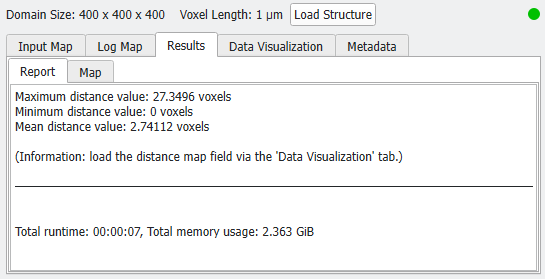
The Maximum distance value is the maximum value found in the computed Euclidean distance map. It corresponds to the maximal distance a point within the selected Material ID(s) can have to the next boundary.
The Minimum distance value is the minimum value found in the computed Euclidean distance map. Be aware, that this is in general not the minimum distance a point within the selected Material ID(s) can have to the next boundary, because also the values inside of the solid materials are taken into account. In the standard case, the Minimum distance value will be 0. For signed distance maps, the result corresponds to the maximum (negative) distance a point within the foreground material can have to the boundary.
The Mean distance value is the average of all values in the computed Euclidean distance map. All materials (foreground and background) are taken into account when the average distance is determined.
Euclidean Distance Transform Results: |
|---|
|
