Results Tab
Report
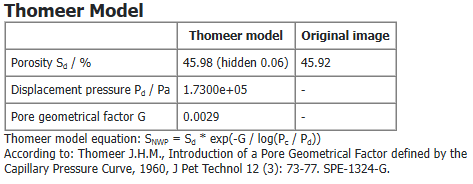
In the Report tab, if Compute Thomeer Model was checked in the options tab, the results are shown at the top of the Reports tab. This can also be computed as a post-processing step.
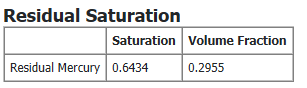
If an additional Mercury Extrusion was computed, the Residual Saturation of the mercury at the end of the extrusion simulation is given. Both the Saturation (using the pore space as reference volume) and Volume Fraction (relating to the total sample volume) are displayed.
Then, for the Mercury Injection and, if selected, the Mercury Extrusion a table shows the saturation of the mercury (Saturation (Mercury)), the Mean curvature / (1/m), and the calculated corresponding Capillary pressure / (Pa) for every step (pore size). The mean curvature approximates the fluid-fluid interface curvature.
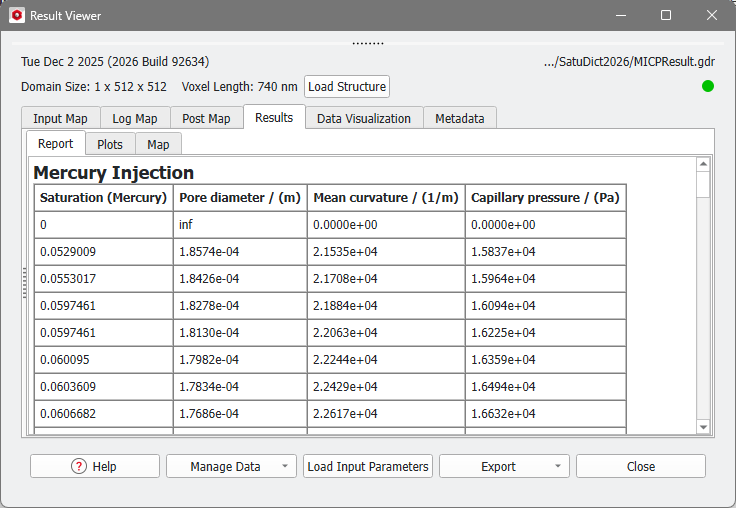
For computations with the Contact Angle Method Constant Contact Angle also the Pore diameter / (m) is shown in the table. This is the diameter of the pores filled in this saturation step.
Plots
Pressure-Saturation
Observe the tabular results of the Report subtab as a diagram in the Pressure-Saturation subtab.
On the left, the Post-Processing Widget allows you to fine-tune this graph. Collapse the Post-Processing Widget by pulling it to the left.
Select the Graph Type (Pressure over Saturation or Saturation over Pressure), the Saturation Unit (Relative or Absolute) and Reference Volume (Pore Space or Total Sample Volume). Check Invert Saturation to show the values of the saturation in decreasing order instead of increasing order.
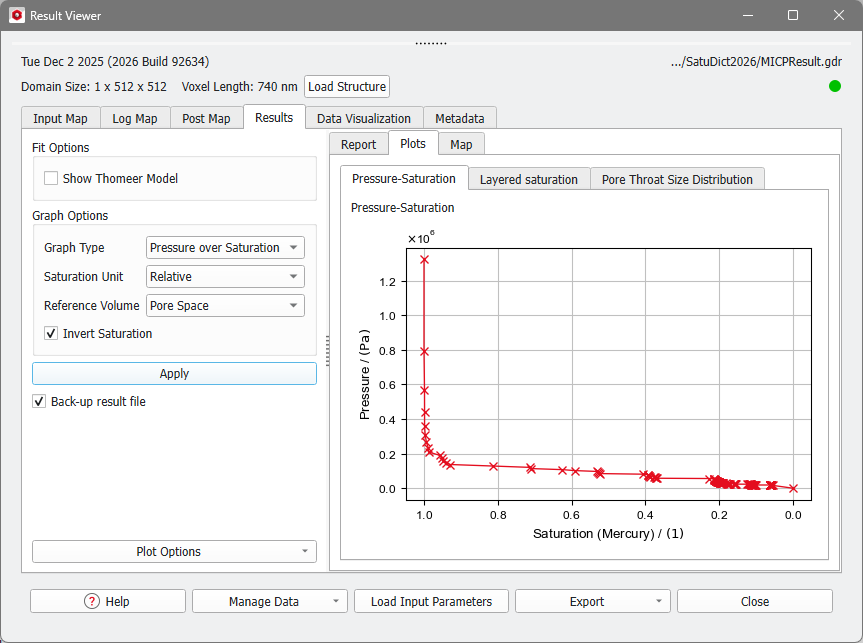
In the example, at the beginning of the injection process, the porous structure does not contain the invading fluid Mercury. As the pressure increases, the Mercury starts invading the structure and the saturation of the Mercury is increasing. By the end of the injection process, where the pressure is at its highest level, the pore space of the structure is 100% saturated with Mercury.
If a Thomeer Model is fitted, this model can be shown by checking Show Thomeer Model under Fit Options. In this case, the Reference Volume is automatically set to Total Sample Volume and Pore Space can not be selected.

Layered saturation
In the subtab Layered saturation, the saturation along each of the three axes (X-, Y-, and Z-axis) is shown.
From the drop-down menu choose the direction to observe. For each layer, the occupied space of the invading fluid relative to the pore volume of this layer is plotted. This can be done for several steps of the calculation, which corresponds to different saturations of the whole structure. By right-clicking into the plot area, the curves of different saturation steps can be selected.

Pore Throat Size Distribution
Using the Washburn / Young-Laplace Equation the resulting capillary pressure values are related to a Pore Throat Diameter. The resulting distribution is shown in two plots, which are very similar to the plots of PoroDict-Porosimetry.

