Convert Trajectories to GAD
The Convert Trajectories to GAD command converts the trajectories currently shown in the visualization area into curved circular fibers and adds them to the 3D structure. The command only has an effect when a particle trajectory (*.gpt) file is loaded and visualized, e.g., from a FilterDict or AddiDict result file.
Click the Options’ Edit… button to open the Convert Trajectories to GAD dialog.
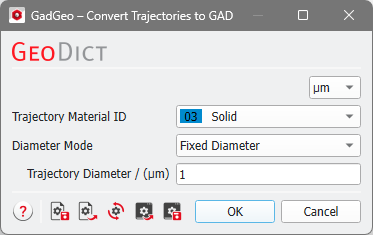
The fiber diameter of the created GAD objects either corresponds to the Particle Diameter or you may select a Fixed Diameter for all trajectories. The command will turn each trajectory (a one-dimensional line) into a three-dimensional object by converting it into a curved circular fiber with the trajectory as the center line. The curved circular fiber will also be added to the current voxel grid. Be aware that only fibers with a diameter larger than several voxels are resolved well in the voxel grid.
Only the trajectories currently selected for visualization in the Particles View Controls tab will be converted into GAD objects.
Close the dialog and click Run to convert the particle trajectories into CurvedCircularFiber GAD objects.
