Domain Panel
In the Domain panel you can define the general parameters for the grid.
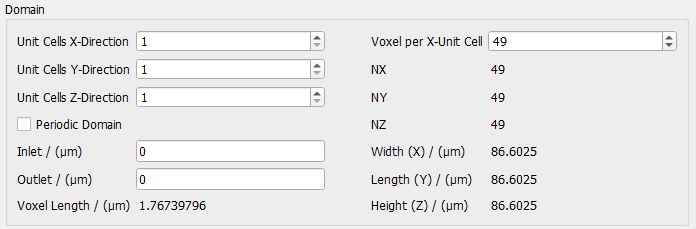
Unit Cells X-, Y-, and Z-Direction
The Unit Cells X-, Y- and Z-Direction define the number of repetitions of the unit cell in space. Observe the effect of setting the number of unit cells for the different directions.
Periodicity of the unit cell
Sphere grids can be generated in a periodic domain in GridGeo when Periodic Domain is checked. This means that a sphere cut by the domain boundary will enter the domain periodically on the opposite domain boundary. Hence, if a sphere is cut by the boundary all parts (the sphere is cut into) are visible. If this option is not checked the grid domain is not periodic. This difference is explained in more detail below with the example of a Simple Cubic grid.
When a unit cell of the Simple Cubic grid is generated when Periodic Domain is checked, it looks like 8 cut spheres are located at the corners of the unit cell. In reality, there is only one sphere in the unit cell. This sphere is repeated periodically and, therefore, appears again at the opposite sides of the cell.
This can easily be examined by looking at the structure information panel located to the left of the GeoDict GUI: There is only one GAD object in the structure. When embedding the structure with Model → ProcessGeo → Crop, Embed & Add Layers → Embed in a larger domain (and choosing Embed Analytic Objects), only that single sphere appears in the domain.
Creating a Simple Cubic Grid without Periodic Domain chosen leads to 8 GAD objects existing in the structure. When this structure is now embedded (Model → ProcessGeo → Crop, Embed & Add Layers → Embed), 8 complete spheres appear in the final structure.
Inlet and Outlet
With the Inlet and Outlet option, additional space can be added at the bottom and top of the structure (in Z-Direction). The Inlet is in Z- direction, the Outlet is in Z+ direction. This might be useful for flow simulations.
Cell size and Voxel length
As explained in Unit Cell Definition, the unit cell size in metric units (Width (X), Length (Y), and Height (Z)) depends on the chosen Sphere Packing Mode, and the given Unit Cell Size or Sphere Diameter and Sphere Center Distance, respectively.
The number of voxels in the unit cell (NX, NY, and NZ) is computed based on the entered number of Voxel per X-Unit Cell. The unit cell of the Simple Cubic, Body-Centered Cubic and Face-Centered Cubic grid types are cubic, therefore, the number of Voxel per X-Unit Cell also sets the number of voxels for the other two directions. For the Hexagonal grid the unit cell is a cuboid and the number of voxels in the Y- and Z-direction are set according to the Length and Height together with the voxel length.
The Voxel Length itself is not editable, but computed from the number of Voxel per X-Unit Cell and the Width (X) of the unit cell. Thus, the number of Voxel per X-Unit Cell also sets the resolution of the structure.
For hexagonal grids, it is not possible to achieve the exact side lengths of the (theoretical) cuboid unit cell with cubic voxels. Therefore, GridGeo approximates the unit cell in the given resolution. This leads to a slightly different unit cell size in each resolution, and therefore the resulting positions of the spheres will depend on the selected resolution. Furthermore, it is possible that in some cases the spheres may slightly overlap, even for cases where a Touching Configuration was selected. To evaluate the effect of choosing the number of Voxels per X-Unit Cell on the resolution of the structure, it is important that the 3D-structure mode is set to Box (select View → 3D Structure Renderer → Box).
