|
Navigation: GeoDict 2026 - User Guide > Material Modeling > WeaveGeo > Single-Layer Weave > Satin Weave |
Scroll |
Solver Settings
In the Solver Settings tab, choose between the default Classic WeaveGeo solver and the FreeWeave Solver.
The Classic WeaveGeo solver directly creates the structure without considering the thread contacts by a physics-based iterative solver and leads to good results in most cases. This solver has no parameters to be set.

Alternatively, you can select the FreeWeave Solver, which produces more realistic structures but may also result in longer generation times.
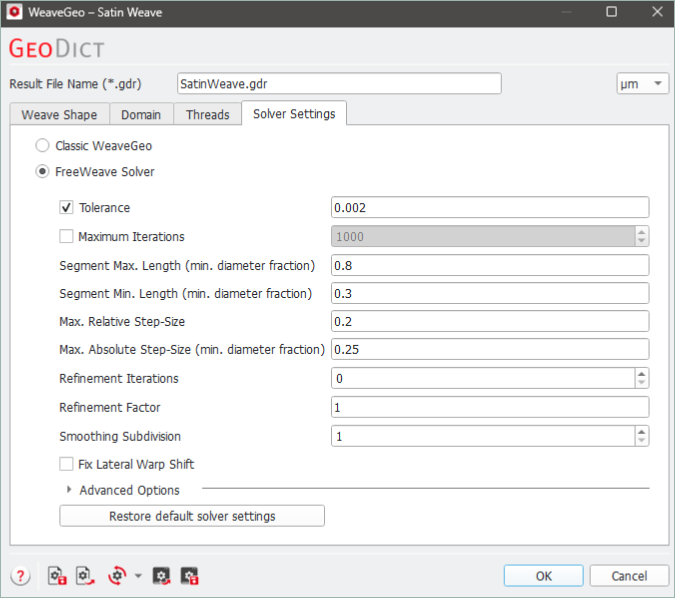

The FreeWeave Solver performs a physical simulation when generating the weave as an iterative process. During the simulation, the threads are tightened and their interaction, such as collisions, is considered. The Tolerance represents the reduction in the height of the weave due to the simulated tightening between subsequent iteration steps. The simulation stops if the height reduction is below this threshold for several iterations. This method is not suitable for all types of weaves. Thus, another stopping criterion is the Maximal Iterations, where the solver stops once the entered number of iterations is reached. These two criteria can be selected together, and the solver will stop when either criterion is satisfied. Threads are divided into linear segments and their Segment Length is relative to the minimum thread diameter. The Segment Min. Length should be less than half of the Segment Max. Length. The Max. Relative Step-Size and Max. Absolute Step-Size define how much a thread may be moved during one iteration. The Max. Absolute Step-Size is defined by the given value multiplied with the smallest fiber diameter. It should be smaller than 0.5, to avoid fibers “jumping over” other fibers with which they collide. The value for the Max. Relative Step-Size is multiplied with the length on which two fibers overlap and should be smaller than 1 for a stable simulation. In case of overlap, the smaller value of Max. Absolute Step-Size and Max. Relative Step-Size size is used. After either Tolerance or Maximal Iterations stopping criteria are fulfilled, the fibers are subdivided into smaller segments over several iterations given by Refinement Iterations. These iterations are done in an additional solver run pass. The Refinement Factor defines to which extent the Minimum and the Maximum Segment Length are reduced at the end of the refinement iterations. A value of 0.1 means that the Minimum and the Maximum Segment Length are reduced to 10% of their start values. The Refinement Factor is a number that is larger than or equal to 0.1 and less than or equal to 1. If the Refinement Factor is set to 1, this feature is disabled and no Refinement Iterations are performed. Smoothing Subdivision performs a subdivision and spline interpolation as a post-processing step after the simulation. The primary use for this is in visualization to make the structure appear smoother. As it only happens once at the end of the simulation, it is not computationally expensive. The number given here is the number of subdivisions to perform and it is thus a positive integer number. A value of 1 will perform no subdivision. A value of 2 will split each segment into two segments etc. In most situations, increasing the value beyond 3 will not give a noticeable improvement. If Fix Lateral Warp Shift is activated, the entered lateral deformation of the warp threads is fixed during the creation of the weave. This means the warp threads cannot move along the lateral direction. Clicking on Advanced Options unfolds additional solver settings. They do not need to be changed for most simulations. Tooltips describe how they can be used if they need to be adjusted. 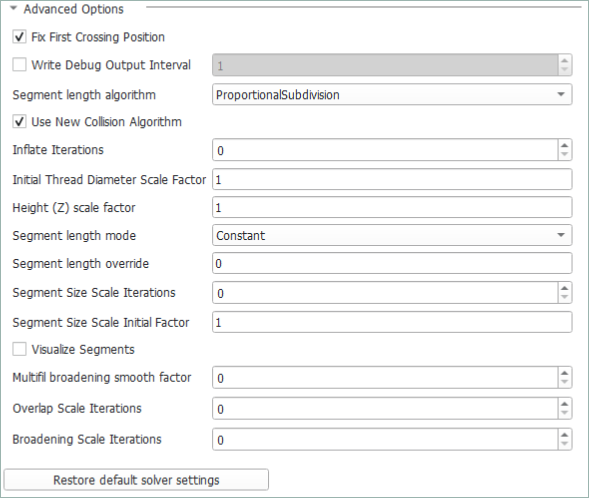 When the option Fix First Crossing Position is enabled, the first crossing point remains fixed at its initial position, preventing drift in the XY plane during the iteration. Enable Write Debug Output Interval to save the intermediate structure to the result folder every N iterations. Choose the algorithm to regulate the segment length when approximating fiber trajectory with the Segment length algorithm:
Enable the option Use New Collision Algorithm to perform a more accurate collision detection. With this option enabled, cylinder-to-cylinder collisions are tested instead of sphere-to-cylinder collisions. The number of initial iterations in which to gradually inflate warp threads can be set under Inflate Iterations. The Initial Thread Diameter Scale Factor specifies the initial fraction of the thread diameter used at the start of the simulation. For example, a value of 0.2 means that the threads start 20% of their defined diameter and gradually expand to 100%. The Z-height will be scaled by the Height (Z) scale factor. It is recommended to set this factor to the same value as Initial Thread Diameter Scale Factor. The Segment length mode determines how the target segment length varies with the fiber diameter.
The Segment length override factor defines whether and how the segment length will be overridden. For non-zero values, the segment length override is enabled. The resulting behavior also depends on the chosen Segment length mode:
The Segment Size Scale Iterations defines the number of initial iterations in which the segment length is gradually increased. This option only works properly with the Legacy segment length algorithm. The Segment Size Scale Initial Factor specifies the fraction of segment length used at the start of the simulation. For example, a value of 0.2 means that the initial segment length is 20% of the defined segment length. If the option Visualize Segments is checked, control points of the segments are shown using spheres. The Multifil broadening smooth factor is an integer value that controls the smoothing of the curvature computation. If this value is greater than zero, a broadening algorithm is enabled that computes broadening for the entire multifilament bundle instead of the individual filaments. The Overlap Scale Iterations parameter defines the number of initial iterations during which the overlap is gradually increased to the specified maximum value. In the first iteration, no overlap is applied. The Broadening Scale Iterations parameter defines the number of initial iterations during which the broadening is gradually increased to the specified maximum value. In the first iteration, no broadening is applied. |
©2026 created by Math2Market GmbH / Imprint / Privacy Policy
