|
Navigation: GeoDict 2026 - User Guide > Material Modeling > WeaveGeo > Complex Multi-Layer Weave |
Scroll |
Global
The Global tab allows you to make Global Settings for the domain. The Unit Cell Size is computed based on these settings and displayed. You can also set up the Weft- and Warp-Layer System here.


Select the material that occupies the space surrounding the threads (e.g., air) from the GeoDict Material Database using the Pore / Matrix Material (ID 00) button. See the Material Database User Guide for more information. The surrounding material always has Material ID 00. The values for Unit Cells in X/Weft-Direction and Unit Cells in Y/Warp-Direction determine how many times the generated unit cell is repeated. If a GeoDict simulation with periodic boundary conditions will be performed on the structure later on, one unit cell is sufficient. It is also possible to activate and enter a X/Weft Stretch Factor and Y/Warp Stretch Factor, which should be close to 1. If the Stretch Factor is enabled, the simulation is done in two stages. First a simulation without this option is done, then a stretching is done and the final position of the threads is determined. If the X/Weft Stretch Factor is, e.g., 1.05, the domain is enlarged by 5% in X-direction before the second stage of simulation. In the second stage the threads are tightened to reach again their initial length. In the Result File a table shows the remaining error of this process. The Voxel Length, Inlet, and Outlet settings are explained on the Domain tab for plain weave. The Crimp Factor, Vertical Thread Overlap, and Random Seed are explained on the Weave Shape tab for plain weave. |
Any number of layers can be defined for the Weft-Layer System and the Warp-Layer System. The layer with the lowest number is the bottom layer. Layers are added by Add Layer and are stacked on top (in Z+ direction). Delete the topmost layer by clicking Remove Layer. The parameters of each layer can be edited by double clicking on a value. The Density is the ratio between the Yarn Counts (i.e., the number of threads) in the different layers. It must be a positive integer. The Yarn Count is the absolute number of yarns in the unit cell and is defined in Layer 1. The Yarn Counts in the subsequent layers are defined by the Density values. Therefore, the Yarn Count for Layer 1 must be divisible by the Density for Layer 1. The number of threads in a layer can later be adapted by hiding threads. Example: Layer 1 consists of 4 yarns and Layer 2 contains 8 yarns: 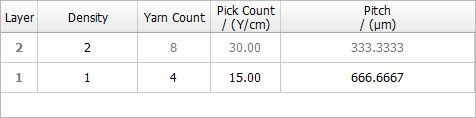 Layer 1 consists of 4 yarns and Layer 2 contains 2 yarns: 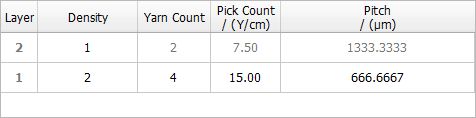 The Pick Count is the number of Yarns per cm and the Pitch is the distance between the midpoints of two adjacent yarns. The Pitch is the reciprocal value of the Pick Count. When one of those two values is changed in the user interface, the other one is updated automatically. |
The values for the Unit Cell Size are not editable since they depend on the definition of the parameters of the structure. For example, the thread widths and pitches and the chosen number of unit cells determine the width and height of the weave. The Unit Cell Size is displayed as the number of voxels (Unit Cell Voxels) in X Direction, Y Direction and Z Direction (approximated) and the corresponding Unit Cell Length is shown in the chosen unit. The weave generation in FreeWeave is based on an iterative solver, therefore the number of voxels in Z Direction can only be approximated here. In the third column, the Discretization Error is shown. It is the length difference between the defined weave and the voxelized (discretized) weave and can be minimized by adjusting the Voxel Length. |
©2026 created by Math2Market GmbH / Imprint / Privacy Policy
