Watershed (Supervoxel)
The Watershed transformation treats the image it operates upon like a topographic map, with the brightness of each point representing its height, and finds the lines that run along the tops of ridges.
The Watershed (Supervoxel) is based on the Euclidean Distance Transform (EDT). Watershed component seeds are placed in the local maxima of the EDT, and in those seeds, components start to “grow”. In the growing process, component boundaries are formed as soon as components touch.
The implemented algorithm detects edges based on the gray value gradient or morphological gradient (see Preprocessing) in the imported 3D image. Subsequently, a distance map is created depending on the edge distances. Maxima in the distance map (see image below) are used as seeds for the watershed algorithm, which is performed on the distance map.
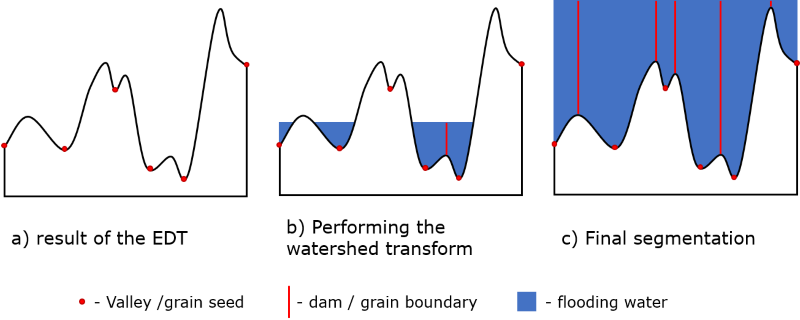
The concept behind the watershed can be understood more easily in a 2D example. In this representation, the EDT can be regarded as a topographical relief, where high values represent valleys and low values represent peaks. This topography is continuously “flooded with water”, starting from the deepest valleys.
As soon as the water from a neighboring valley begins to mix, a dam is created (corresponding to a material boundary). The result is a topography with water-filled valleys and dams that separate them. The identified valleys represent the watershed components and the dams that separate them denote the component boundaries.
In the figure below, the progression of the watershed algorithm is illustrated. On the left side, the topographical relief corresponding to the EDT is shown where the component seeds (valley bottom) are marked in red. This topography is successively flooded with water, and dams are formed between adjacent valleys.
Known information about the component space, i.e., the minimal component diameter, can be used to adjust the results of the Watershed (Supervoxel).
Each watershed component is assigned the mean gray value of this component. This is the supervoxel. The result is a gray value image, that is much easier to segment.
If the image has artifacts in the beginning it is recommended to use other image filters as for example the Non-Local Means Filter before running the Watershed (Supervoxel). Then the algorithm leads to better results.
The name for the file and folder containing the results can be entered in the Result File Name (*.gdr) box. Choose a name fitting the current project.


Click Apply to run the watershed algorithm.
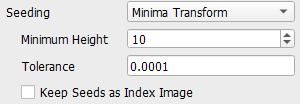
In the following example, a Morphological Gradient with Gradient Radius 2 was applied and for the Minima Transform a Minimum Height of 15 was used. Observe the resulting difference in the Histogram making it possible to simply apply the automatic Otsu threshold.
Results
The result file with the selected Result File Name is opened automatically in the Result Viewer. Under the Results – Report sub-tab the number of watershed components, the minimal, maximal, and mean size of the components can be found.
Move to the Data Visualization tab to visualize the Index Image of Watershed Components in the GeoDict visualization area by clicking Load *.g32. This image shows the individual regions found by the Watershed. For the filtered image visualized in the Image Processing dialog the resulting gray value is the mean gray value of the corresponding region. If the watershed finds the individual objects, the components file can be used as input, e.g., for GrainFind Identify Grains. For many scans, however, the individual objects cannot be recognized from the gray value image.
If Keep Seeds was checked, the Watershed Seeds can also be visualized by clicking the lower Load *.g32 button. Otherwise, it is grayed out. This image shows the seeds specified by the H-Minima Transform algorithm. Use it to rerun the Watershed with different preprocessing parameters as explained above. In the opening dialog, click OK and the index image is loaded in GeoDict. Find more information about GeoDict result files in the Result Viewer user guide.
